Table of Contents
When a Stripe subscription payment fails, Stripe retries the card with Smart Retries and can email the customer, but it stops there. Once the retries run out, the subscription is cancelled, marked unpaid, left past due or paused, depending on your settings. Dunning picks up where retries stop: it keeps contacting the customer and gives them a quick way to fix their card.
This guide covers what Stripe does on its own when a subscription payment fails, where those tools stop, and how to add a dunning layer on top, step by step. Stripe behaviour below is taken from Stripe's revenue recovery docs, checked on 21 November 2026.
Key Takeaways
- Stripe retries; it doesn't chase. Smart Retries re-attempts the charge, and Stripe can send one email after each failure. Everything after that is up to you.
- Retries can't fix a hard decline. For codes such as
lost_cardorstolen_card, Stripe only executes a retry after the customer adds a new payment method. - Dunning adds the customer side: a longer email sequence, SMS, a hosted card-update form, in-app banners and paywalls, and reminders before a card expires.
- Keep both running. Leave Smart Retries on and let the dunning tool handle the messages, so customers don't get two sets of emails.
How do Stripe Smart Retries work?
Smart Retries automatically re-attempts failed subscription and invoice payments, using AI to pick the time each retry is most likely to succeed. According to Stripe's docs, it looks at time-dependent signals such as how many devices have presented a payment method recently and the best local time to charge.
- Default: Stripe turns Smart Retries on for new accounts, set to up to 8 retries within 2 weeks.
- Your policy: you choose a number of retries within 1 week, 2 weeks, 3 weeks, 1 month or 2 months. You can also turn Smart Retries off and set a custom schedule of up to three retries, each a set number of days after the last.
- Where to set it: in the Stripe Dashboard under Billing > Revenue recovery > Retries.
Stripe doesn't retry at all when there's no payment method, when the issuer returns a hard decline, when the card is India-issued, or for payment methods that don't support automatic retries, such as Cash App Pay and Amazon Pay.
What emails does Stripe send when a payment fails?
Stripe can email the customer after each failed payment, with a link to update their payment method. You switch this on with "Send emails when card payments fail" in the revenue recovery settings, according to Stripe's customer email docs. Other built-in emails help prevent failures:
- Expiring card emails, sent 1 month before the default card on file expires.
- Renewal reminders before an automatically charged subscription renews.
- Payment confirmation emails when a payment needs the customer to act, for example for 3D Secure.
- Trial ending reminders, 7 days before a free trial ends.
The link can point to a Stripe-hosted page or to your own subscription management page. Stripe also updates card details automatically when a customer's bank issues a new card number, which prevents some failures before they happen.
Where do Stripe's built-in retries and emails stop?
Stripe's tools stop at the edge of the payment: they retry the card and send an email, but they don't keep working the customer relationship once the retries are done. Specifically:
- Hard declines need the customer. If the issuer returns a code such as
incorrect_number,lost_card,stolen_cardorauthentication_required, the retries stay scheduled but only execute after a new payment method is added. No retry timing fixes that. - Retries end. After the final attempt, Stripe makes no further payment attempts, and the subscription moves to the outcome you chose (see the table below).
- The email channel is one email per failure. Stripe sends a failed payment email after each failed attempt. It doesn't send SMS or show in-app prompts out of the box. You can build custom logic with Stripe's no-code Automations, but you design and maintain it yourself.
- The hosted link expires with the subscription. Stripe's docs say the hosted-page link stops working once the subscription status changes to cancelled, incomplete_expired or unpaid. That's exactly when a customer who missed the emails might finally try to pay.
Here's what Stripe does with the subscription when every retry fails, per its Smart Retries docs:
| Setting | What happens after the last retry |
|---|---|
| Cancel the subscription | The subscription changes to cancelled. |
| Mark the subscription as unpaid | The subscription changes to unpaid. Invoices keep being generated and stay in draft. |
| Leave the subscription past due | The subscription stays past_due. Invoices keep being generated and charged according to your retry settings. |
| Pause the subscription | If eligible, the subscription is paused and Stripe stops generating new invoices until it resumes. |
Some failed payments clear without any outreach. In Baremetrics' Q3 2026 Recovery Index, 17% of recovered payments were paid before the first dunning email went out, for example because the processor retried the card or the customer updated it on their own. The rest were paid after the first email had gone out, a median of four days after the payment failed.
What does dunning add on top of Stripe?
Dunning adds the customer side of recovery: repeated, well-timed contact on more than one channel, and an easy way to fix the card. A dunning tool runs alongside Smart Retries rather than replacing it. Here's how the pieces compare:
| Recovery job | Stripe built in | Dunning layer (e.g. Baremetrics Recover) |
|---|---|---|
| Retry the charge | Smart Retries or a custom schedule | Left to Stripe. Recover has no retry schedule of its own. |
| Email sequence | One email after each failed payment | A timed sequence (7 emails by default in Recover), in your branding, sent from someone on your team |
| SMS | Not built in | Text reminders alongside the emails |
| Card-update page | Stripe-hosted page (link stops working once the subscription is unpaid or cancelled) | A branded, no-login card-update form linked from every message |
| In-app banners and paywalls | Not built in | A banner during a grace period, then a paywall until the card is updated |
| Before the card fails | Expiring-card email 1 month before expiry | Card-expiry reminders (Recover sends two, 30 and 7 days before expiry) |
Each channel catches a different customer. Email works for most people. SMS reaches customers who don't open billing emails. The in-app banner catches customers who still use your product, and the paywall turns a passive problem into one they have to fix before they can continue. The card-update form matters most, because every other message points to it. For email copy, see our guide to writing effective dunning emails.
How do you set up dunning on Stripe, step by step?
Keep Stripe in charge of retries, hand the customer messages to your dunning tool, and make sure the two don't overlap. The settings below follow Baremetrics' Recover setup guide. Other dunning tools have their own recommended Stripe settings, so check their docs before you change anything.
- Check your retry policy. In Stripe, go to Billing > Revenue recovery > Retries and make sure Smart Retries is on. The Recover setup guide's example uses up to 4 retries within 1 month.
- Choose what happens when retries run out. The Recover setup guide shows "mark the subscription as unpaid" for the subscription and "leave the invoice as-is" for the invoice, so the subscription doesn't cancel while the customer is still being contacted.
- Turn off Stripe's failed payment emails. Switch off "Send emails when card payments fail" so customers get one sequence, not two. If your dunning tool sends card-expiry reminders, consider switching off Stripe's expiring-card emails too.
- Connect Stripe and turn on Recover. If Stripe is already connected to Baremetrics, Recover is an add-on you enable from the dashboard. Once connected, Recover creates emails for failed charges from up to 31 days before you connected.
- Authenticate your sending domain. Add the DNS records from the Recover settings so emails reach the inbox, not spam.
- Write the email sequence. Recover starts you with 7 templates. Switch each one on, or rewrite the copy, branding and sender first.
- Add SMS. Import customer phone numbers, turn on the SMS reminders you want and add your template. SMS runs alongside email, uses prepaid credits, and every message includes an opt-out.
- Set up the card-update form. For the Baremetrics-hosted billing link, add your Stripe live publishable key and enable the hosted form. You can host your own page instead.
- Embed the in-app reminder. Add the Recover snippet to your app. During the grace period you set, customers see a banner. After it, delinquent mode shows the card form and blocks the app until they update their details.
- Measure the right rate. Track attempted recovery rate (recovered ÷ recovery attempts), so failures your dunning tool never tried to recover don't distort the number. Baremetrics' Q3 2026 Recovery Index puts the median at 29.4% (July to September 2026).
How does Baremetrics Recover work with Stripe?
Recover works alongside Stripe: Stripe retries the card, and Recover automates your revenue recovery process by handling the conversation with the customer. Here's the sequence after a charge fails, per the Recover product page and help docs:
- Stripe retries the payment with Smart Retries or your custom schedule. Recover doesn't retry or charge payments.
- Recover detects the failed charge in Stripe and starts the email sequence, plus SMS for customers with a phone number on file.
- In-app banners, then a paywall, reach delinquent customers when they log in.
- The customer updates their card on the hosted form, and Recover saves the new card to the customer in Stripe. Whether Stripe then charges the open invoice straight away depends on your Stripe settings, not on Recover.
- Recover attributes each recovery to the email or banner the customer interacted with, and the results sit in Baremetrics next to your MRR and churn.
Recover also sends card-expiry reminders and annual renewal reminders before a charge can fail. You can exclude segments such as VIP, enterprise or manually billed accounts from the automated flow. Beyond Stripe, Recover works with Braintree and Recurly, and with Chargebee where customer email addresses are collected. Recover is an add-on to a Baremetrics plan; see current plans and prices. To compare it with other tools, see the best dunning software or Baremetrics Recover vs. Churn Buster.
Baremetrics Recover
Pick up where Stripe's retries stop
Recover automates your revenue recovery process on Stripe: customizable email + SMS sequences, in-app reminders and paywalls, card-expiry reminders, and a branded card-update form customers can complete in seconds. Stripe keeps retrying the card.
Start your free trial → See how Recover works
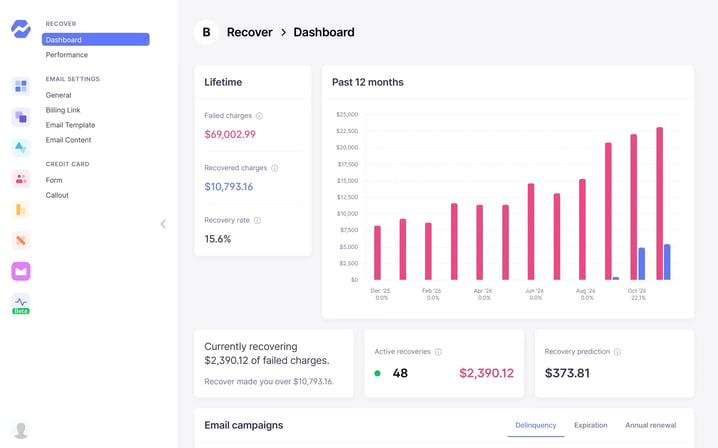
Screenshot shows sample demo data.
Frequently Asked Questions
How do I reduce failed payments and involuntary churn on Stripe subscriptions?
Use three layers. Turn on Smart Retries so Stripe re-attempts declined charges at good times. Then contact the customer, because a retry can't fix an expired, lost or replaced card: a dunning sequence of emails and SMS, in-app banners and a hosted card-update form. Finally, warn customers before their card expires so fewer charges fail at all.
How many times does Stripe retry a failed payment?
It depends on your settings. Stripe's docs say new accounts get Smart Retries by default, set to up to 8 retries within 2 weeks. You can choose the number of retries within a window of 1 week, 2 weeks, 3 weeks, 1 month or 2 months, or set a custom schedule of up to three retries.
What happens when Stripe's Smart Retries fail?
After the final attempt, Stripe makes no more payment attempts, and the subscription moves to the outcome you chose: cancelled, unpaid, left past due or paused. If the issuer returned a hard decline such as lost_card or stolen_card, retries only run once the customer adds a new payment method.
Does Stripe send dunning emails?
Stripe can send an email after each failed payment, with a link where the customer can update their payment method. It can also send expiring-card emails a month before the card expires. It doesn't send SMS or show in-app prompts out of the box. The hosted-page link stops working once a subscription is unpaid or cancelled.
Does Baremetrics Recover replace Stripe Smart Retries?
No. Recover has no retry schedule of its own, so Stripe Smart Retries keeps retrying the card. Recover automates your revenue recovery process around those retries: timed emails (7 by default), SMS, in-app banners and paywalls, card-expiry reminders and a hosted card-update form that saves the new card to the customer in Stripe.
Should I turn off Stripe's failed payment emails if I use a dunning tool?
Usually, yes. Two tools emailing the same customer about the same failed payment is confusing. Baremetrics' Recover setup guide shows Stripe's "Send emails when card payments fail" switched off while Recover runs the email sequence. Smart Retries stays on.
Can I remind customers before their card expires?
Yes. Stripe can email customers 1 month before the card on file expires. Baremetrics Recover sends two card-expiry reminders, 30 and 7 days before expiry. If you use Recover's reminders, consider switching Stripe's version off so customers don't get both.