
Table of Contents

Websites have been around for so long that it seems we’ve started taking them for granted. However, they are still a starting point for many customers online.
From giving the business more authority to creating sales funnels, you can miss out on many opportunities to connect with your audience if they walk away with a bad user experience after visiting your website.
Remember that adding new content is not enough—you need to keep tracking all the factors that impact the optimization and its ranking.
There are many improvements you can make to ensure that your landing pages are user-friendly, starting with design and ending with backend adjustments. Let’s discuss some steps that’ll give your visitors a great experience and improve the SERP ranking in the process.

Simple navigation and readability
All technical buzzwords aside, the visual aspect is one of the key factors which impact visitors’ impression of your website.. This doesn’t refer just to images and good color choices (although they’re important as well). The ways you set up all elements of a page have an impact on UX which is why you should always approach the edits from a user’s perspective.
Design and content
One of the best ways to determine if your website’s visual presentation is up to standard is through user testing. This helps you get to know ins and outs of everything that could be an issue for the average visitor.
Implementing usability testing tools such as PlaybookUX could save your time in the long run. You can use it to watch real people interact with your website, see which materials resonate with your visitors and understand their needs before you add new pages. This makes the testing process easily scalable.
One of the key aspects of making everything more user friendly is content readability. Aside from a clear, readable font (never choose style over functionality when it comes to fonts), you should also think about how users will interact with it. Many visitors just gloss over text and that means you need to do everything you can to make the message as accessible as possible.
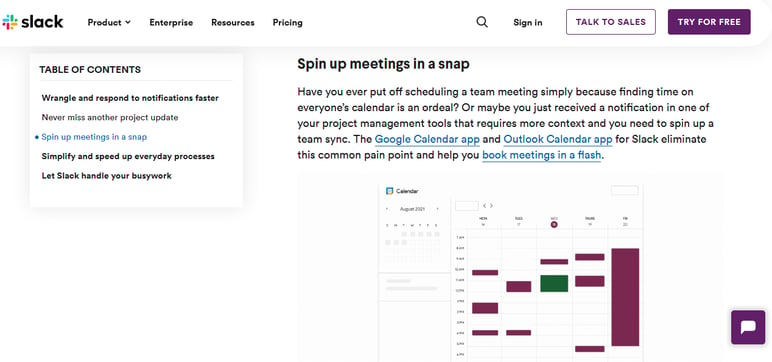
For example when you include a clickable table of contents, it makes it much easier to read through.
Source: Slack
Some ways to make content more readable include:
-
Appropriate headings and subheadings – Use a single H1 for the subject of a page, while thinking about H2 as chapters for the content below. If you need to go into more detail, use H3 for sub-sections.
-
Number or bullet lists
-
Paragraphs that aren’t too long. Ideally, they shouldn’t have more than 2-3 sentences.
-
A mix of text and images
-
Bold and italic fonts. Rather than using all caps or different sizes of text, use these to make information stand out.
You can also add contrasts and highlights in appropriate spots to improve readability. This is especially important when it comes to links—users should always be able to distinguish them from other text, so they need to look clickable.
Organization
Aside from being easily recognizable, links should streamline the user’s path through the website. They should also offer relevant pages to go to next and suggest content related to what the user has read.
Additionally, make sure to include CTAs—they should appear at appropriate moments in the visitor's flow and make it logical to take a certain action.
Navigating through the website should feel fluid. you need to organize your content in a way that’s logical and provides user-friendly ways to engage with it.
To do this, Consider your website’s search feature and ways to improve it. Here are some steps that’ll make it easier for your audience to improve the users’ experience:
-
Allow alternate spellings and typos so it’s easier for the users to reach the things they’re interested in
-
Offer suggestions for similar content and highlight keywords that can lead the visitors to a related page
-
Show the most recent additions on top so the users can save time on sorting content
Categories such as the About page, Contact information, as well as details about other business specifics should be clearly visible. You’ll achieve this by creating a clear structure, with navigation and different tabs properly labeled, so the users don’t have to do any guesswork.
Source: Airbnb
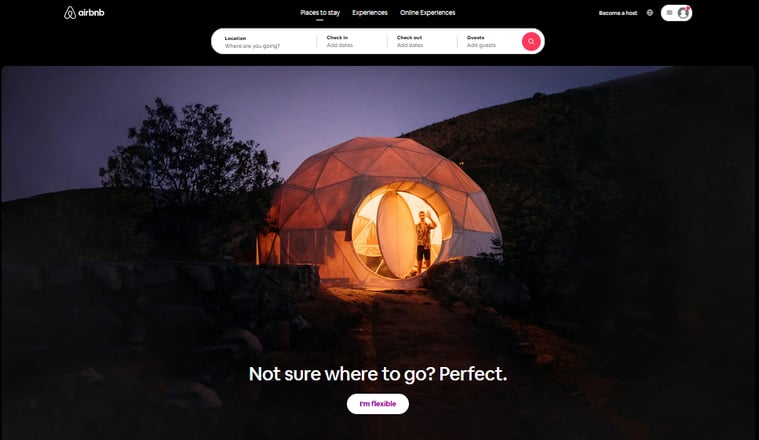
The Airbnb homepage is a good example of this, as you can see the most important category fields for your search right away.
Some additional ways that can help you organize content:
-
Place the most important information first
-
Avoid using industry jargon and confusing abbreviations
-
Use tags for your content so that users can search more efficiently
-
Don’t place too many elements in the navigation
-
Remove dead-ends, such as pages without links
Responsive and accessible usability
After you’ve taken care of your website's content and presentation needs, you need to dive into the technical side of things. Verify that you’ve done everything to make your website as user-friendly as possible for all users, regardless of how they access it.
Compatibility
Mobile devices excluding tablets generate more than 50% of all website traffic, so a responsive and scalable experience that’s mobile-friendly should be a standard. Each user should have a near-identical interaction no matter what they’re using for their visit.
All of the elements, from navigation to text and images, should be automatically formatted, resized, and spaced.
When we talk about your website being responsive, it doesn’t just include devices. You should also make sure that each browser and operating system is equally supported so that you can reach a broad audience.
To make the experience even more user-friendly, you should reduce loading time as much as possible. Not only are the users more likely to leave your website if the pages take too long to load, but better times also improve your search engine ranking.
If you’re unsure of how to make your loading times faster, you should avoid excessive videos, optimize images and fonts, remove non-essential widgets, as well as third-party plug-ins.
Accessibility
When it comes to widespread access, you shouldn’t just stop at the means of visiting your website. Users themselves shouldn’t have any obstacles in getting to your content.
Have in mind that people with disabilities may also visit your website. Implement web design techniques that’ll ensure a seamless experience for everyone. For example, add audio navigation to make the pages accessible for visually-impaired visitors.
Source: The Disability TRUST
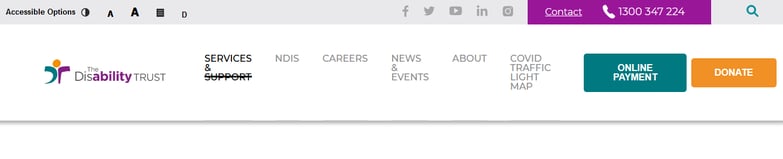
For example, The Disability Trust's homepage clearly displays various accessibility options right at the top.
Users should also always know what’s going on regarding their actions. For example, each error should be clearly labeled, with a direction provided for further actions. It should always be clear to users what they need to do to get the desired outcome. Another example of this would be adding a direct call widget in the contact section.
If you’re using forms, for example, to get feedback, avoid asking for too much data and try showing a progress bar so they’ll know the status at any point of the process.
Technical setup
Finally, you need to consider ways to solve any backed issues that may come up. It’s important to run extensive tests to catch any possible bugs that may impair your website’s functionality. Broken links also impact user experience, so you need to do a clean-up that will leave you with content that doesn’t stop the users’ flow.
Aside from functionality, you also need to perform regular security checks to make sure everything’s up to current standards. Google prefers websites that are secured with a SSL certificate. This distinction indicates a couple important factors that both raise your search engine ranking and give users additional assurance that they can trust you:
-
Website data, including passwords and e-mail addresses are protected from hackers
-
Your page’s identity is identified through a third party so nobody can use your website’s name for malicious and deceptive pages.
One of the best ways to ensure that you have the green light is to run the URL through the Google Safe Browsing tool.
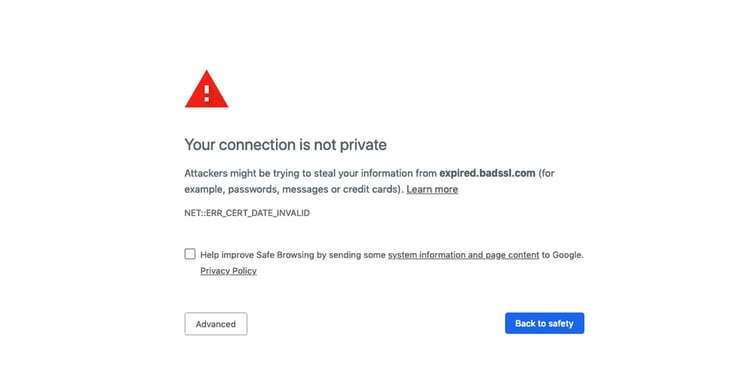
If you don’t set it up properly, users will be warned that they shouldn’t visit your website, so you could miss out on a lot of traffic.
Source: Websiteplanet
The easiest way to check if your website is secure is to look for a padlock symbol next to the URL address, indicating the available protection.
You should also keep your plug-ins up to date to make your website even less vulnerable to outside risks.

Summary
When verifying that your website is user-friendly, it’s important to go over all the ways your users will interact with it and test whether everything flows as it should. This way, you’ll avoid users’ frustration, which can impact your website’s ranking and the business as a whole in the long run.
Start with a usability test and run through your content. Think about how users can perceive it, whether the design is easily readable, and whether everything is sorted in a simple, efficient way.
Your Next step should be optimization and ensuring that as many users as possible can access your content without obstacles, including devices, systems, or personal obstacles.
Finally, dive into the technical side of things and keep security as tight as possible to further improve your ranking and prove to your users that they can trust you.
