Table of Contents
What’s the first thing you do after a customer cancels their account?
If you answered “Send a cancellation survey to find out why,” you win!
Unfortunately, a lot of SaaS and subscription companies either:
- Do nothing
- Send a generic “sorry to see you go” email
Neither of those responses are helpful to you or your customers.
When you send cancellation surveys, you learn why customers are churning and give your users an opportunity to voice their opinions.
However, not all cancellation surveys are effective.
In this article, I’ll break down what cancellation surveys are, the best way to create and send them, and what you should do with the responses. Let’s dive in!
What are cancellation surveys?
A cancellation survey is a series of questions you send to users who have canceled to learn about why they canceled and their overall experience with your product.
Typically, you send a cancellation survey immediately after a customer cancels their account. That way, your product is still fresh in their mind, and they’ll be more likely to give you a response.
Cancellation surveys can be an insanely valuable way to learn why customers are churning and to steer the direction of your product.
For instance, Usersnap took the small step of adding a field in their unsubscribe page for users to tell them why they want to cancel. After collecting some responses, they spotted a common trend.
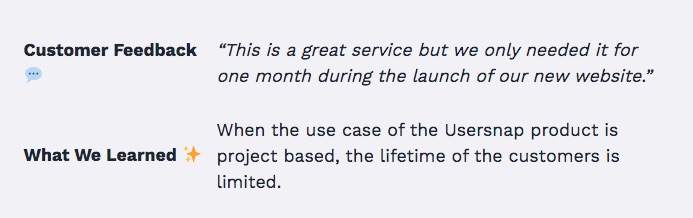
Customers only saw a one-time need for their product, which limited their customer lifetime value and resulted in fast churn.
They took that feedback and created a new product line that gave users a reason to stay longer. The result was more long-term customers and lower churn.
While Usersnap puts their cancellation reason right into their unsubscribe page, that’s not the only way to conduct the survey. Let’s discuss how to actually create and send your cancellation survey to customers.

How to create and send cancellation surveys
There are a few different ways to create cancellation surveys. Some companies use tools like Google Form, Wufoo, or Jotform.
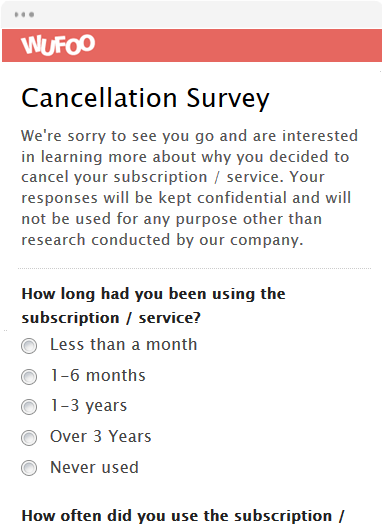
If you go this route, what you’ll do is create the survey and then send the link to users after they cancel. Some of these tools also allow you to embed your forms on your website.
The benefit of this method is that it’s free. The downside is that “free” usually comes with some restrictions, like less customization, and you’ll likely have to do some manual work to connect your survey results to the rest of your subscription data.
Another method (which is what I’d recommend) is to use a tool specifically for SaaS cancellations. Shameless plug, but we actually built one.
Here’s how it works.
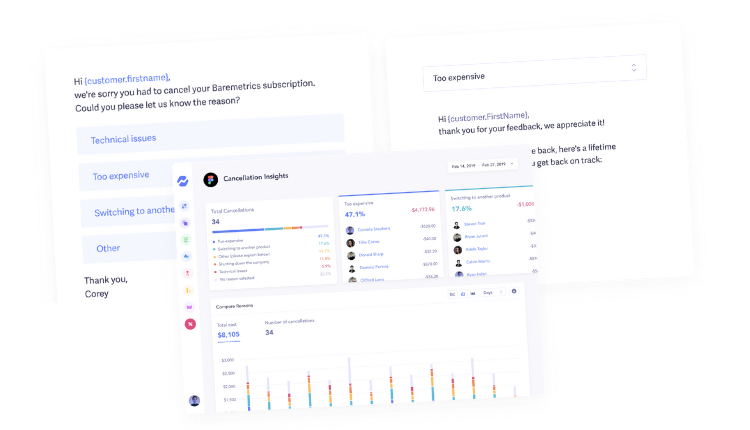
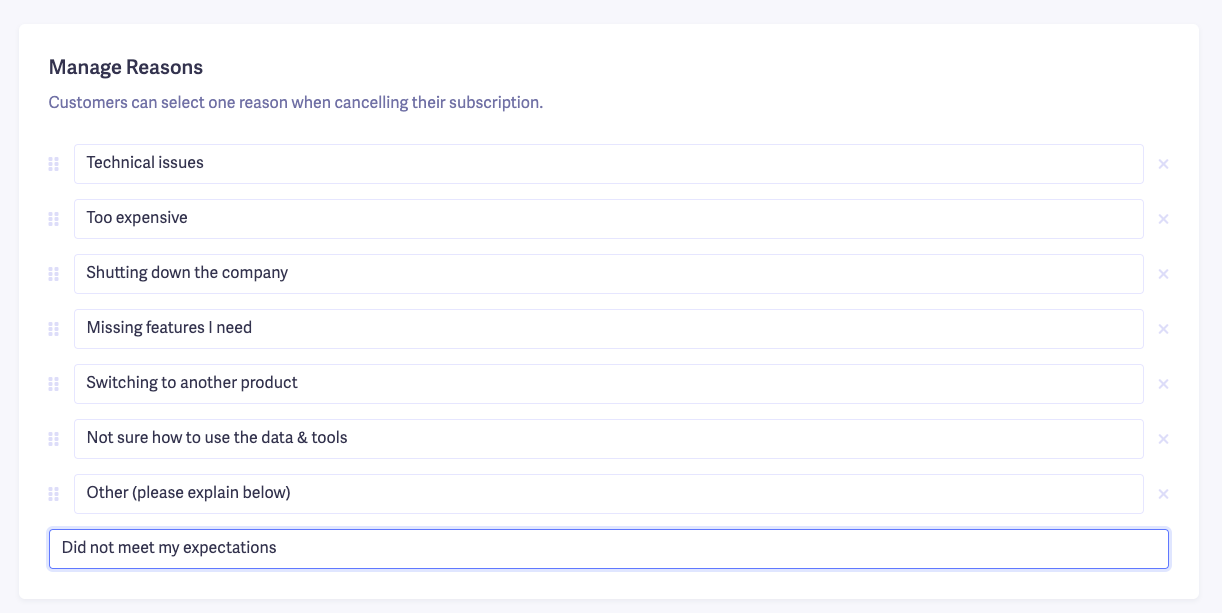
You create a form where users can choose their cancellation reason.
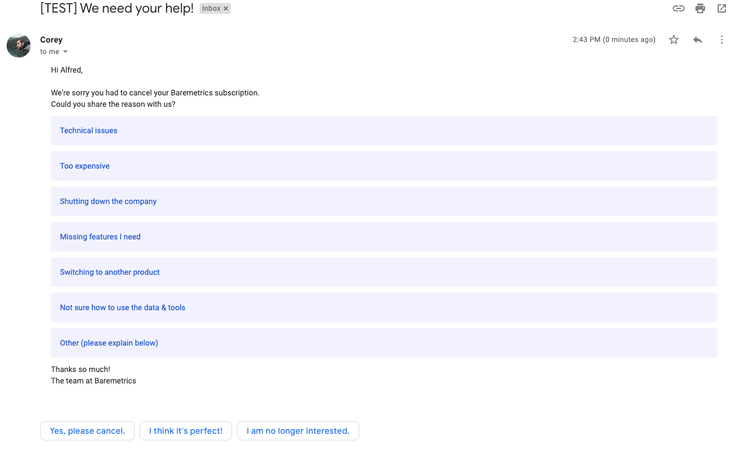
You can send this survey through email, which looks like this.
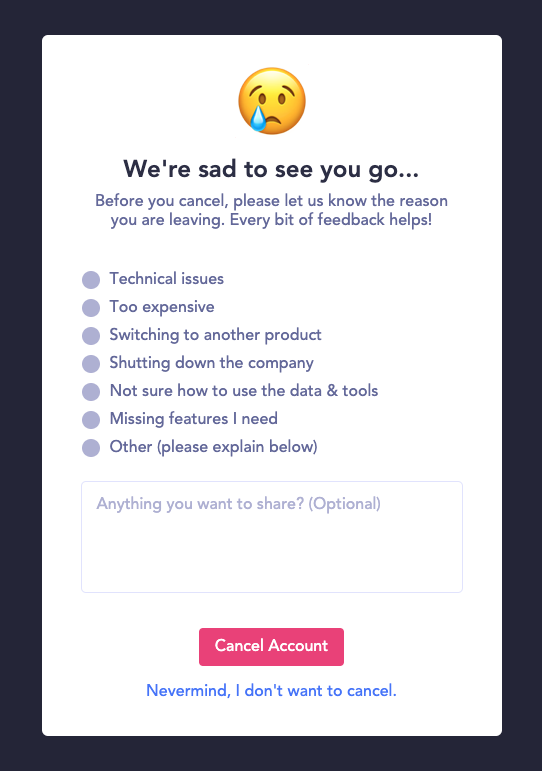
Or embed the form on your cancellation page.
When the user chooses their cancellation reason, it is saved to their account profile in Baremetrics. Thus, you can see exactly when and why each customer cancels (without having to import it from another tool).

Then, after they select their cancellation reason, you can create a follow-up email to send based on their response. I’ll talk more about this step later.
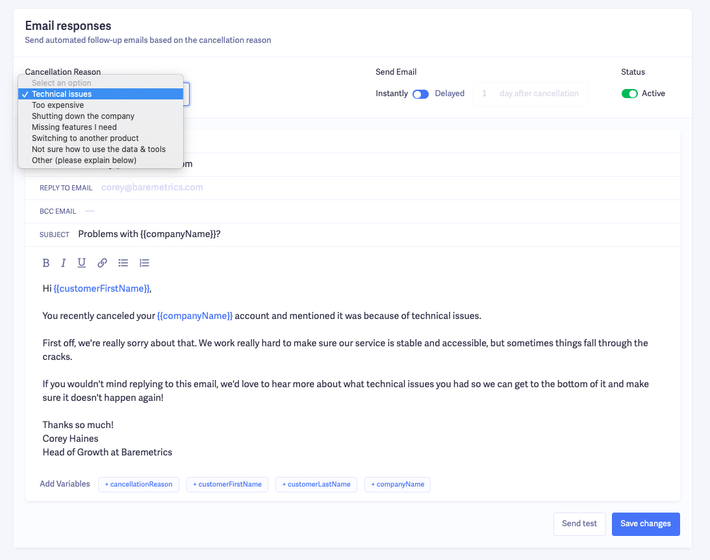
And you can track when (or if) they open the email.
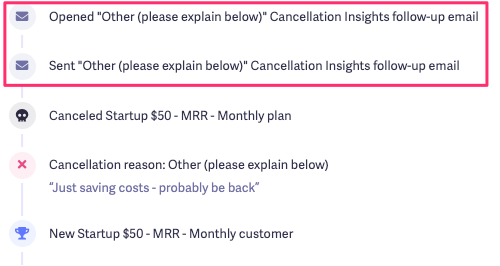
Last but not least, we aggregate all the data from the survey so you can see which cancellation reasons are most common and which cost you the most revenue.

If you’re interested in giving Cancellation Insights a try, you can check it out for free here.
What your cancellation survey should include
What you put in your cancellation survey is going to play a big role in the number of people who actually complete it.
Remember, you’re sending this survey to people who have just canceled and decided your product isn’t for them. So, they’re probably not in the mood to fill out a 10-minute survey.
So first, let’s talk about how long your survey should be.
Survey Monkey did some research into survey completion rates, and here are some key points I took from their findings:
- The more questions, the less time people spend answering each. At a certain point, people start speeding through the questions to finish, which can taint your data.
- Longer surveys have a higher dropoff rate. After spending 7-8 minutes on a survey, completion rates dropped between 5% and 20%.
- If you want more thoughtful responses, keep your survey short.
With all this in mind, what should you include in your cancellation survey?
Well, here’s what we do at Baremetrics.
First, we send the initial cancellation survey, which asks for a cancellation reason. Then, we send the follow-up email, which asks for any additional feedback.
Here’s what the process looks like.
Initial survey:
After they choose a response, we send this follow-up email to get more details:
From there, we might do an exit interview to get more feedback.
Notice how the flow is simple and doesn’t require much heavy lifting on the user’s part.
Some companies turn their cancellation surveys into product usage and customer satisfaction surveys all in one. The problem with those is they tend to be longer, and you collect data that you probably won’t act on.
For instance, here’s an example of a cancellation survey from a company with a couple of common questions SaaS companies ask.
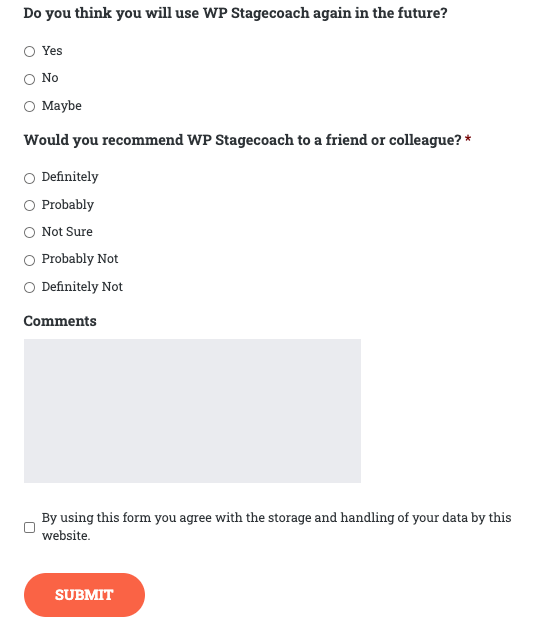
I suggest steering away from questions like “Do you think you will use X again?” and “How likely are you to recommend us to a friend?” because, without additional context, the responses aren’t actionable.
If someone replies they’d “probably” recommend your product to a friend, what will you do with that info?
And let’s say 40% of people responded they wouldn’t use your product again, what would you do with the data? Unless they follow up with more details, there’s not much you can do besides make assumptions.
Compare this to our example, where we only ask for their cancellation reason. Even if the user doesn’t follow up with us at all, just knowing the reason they canceled at least gives us something to work with.
If you want to go beyond just asking for a cancellation reason, make your questions more actionable. For instance:
- What did you like least about [product]?
- If you could change one thing about [product], what would it be?
Notice how the questions focus on what the user didn’t like. I’ve seen cancellation surveys where the company asks “what was your favorite part about [product]. That’s not a great question to ask someone who just canceled.
Whatever their favorite feature was, it wasn’t enough to justify them keeping your product. So it makes more sense to understand what people are leaving.
But long story short, I highly recommend getting the cancellation reason first, then sending a follow-up email to get more information.
Do this after sending your survey
Most companies just leave it at that after you send your cancellation survey. But the conversation doesn’t have to end there.
Here are some things you can do after you send your cancellation survey to ensure that the information you gather doesn’t go to waste.
Follow up with an exit interview
An exit interview is one of the best ways to get qualitative feedback for users who’ve canceled. Surveys are great, but in exit interviews, you can dive deeper into the specifics of why users canceled.
Just like your survey, your exit interview should focus on what went wrong and what they didn’t like. I know, it’s hard to hear negative things about your product, but you need it in order to make improvements.
I asked our head of growth for some customer exit survey questions to ask. Here’s what he recommended:- What made you question if [product] was a good fit for you?
- When did you decide to cancel, what prompted the decision?
- What are you using instead now?
- What could have been done to prevent cancellation?
- Would you re-subscribe if X was no longer an issue?
All these questions are great for digging into the specifics of why users cancelled beyond their initial cancellation reason.
Use the results to improve your product (and reduce churn)
If you’re not going to take action on the feedback you’re getting from your cancellation surveys, there’s no point in even doing them.
Don’t just do these surveys because you read an article that said they’re a good idea. The responses can give you ideas on how to prevent more customers from cancelling.
Here’s an example of how we used our cancellation survey results to reduce churn.
When COVID first hit, we saw some higher-than-usual churn. Looking through the cancellation reasons, we noticed a common trend.
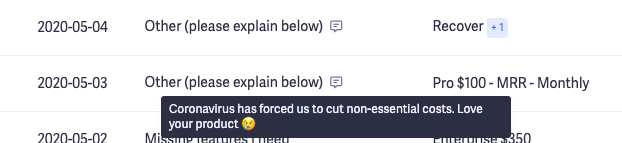
Many users weren’t canceling because they didn’t want our product. They were trying to cut back on expenses until things normalized.
So, we contacted customers who wanted to cancel due to COVID and offered a discount to keep them on board. While we took a short-term hit on revenue from the discount, the value of keeping these customers long-term is worth it.
Pay attention to the responses you get from your cancellation surveys to find opportunities to prevent churn in the future and potentially save customers who are about to cancel right now.

Follow-up with people who did the survey
If you really want to take things to the next level, you can follow up with people who respond to your cancellation survey a few weeks (or even months) afterward.
People’s needs change every day. So while your product might not have been a good fit at that moment, it doesn’t mean things won’t change in the future.
Maybe they switched to a competitor but realized the grass isn’t always greener. Or maybe you released some new features that would tempt them enough to come back.
Create an automatic follow-up email to go to customers who cancelled and see if there’s a chance to win them back. Here’s how to do it with Baremetrics Messaging.
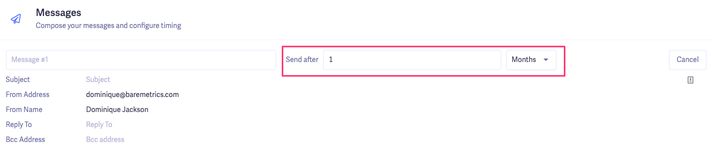
Assuming you already have your cancellation survey set up, you can use Messaging to create customized follow-up emails for days, weeks or even months after a customer cancels.
First, we’ll set up a custom audience to send the emails to. It’ll be people who’ve cancelled their account, haven’t unsubscribed from emails and then we’ll choose a specific cancellation reason.
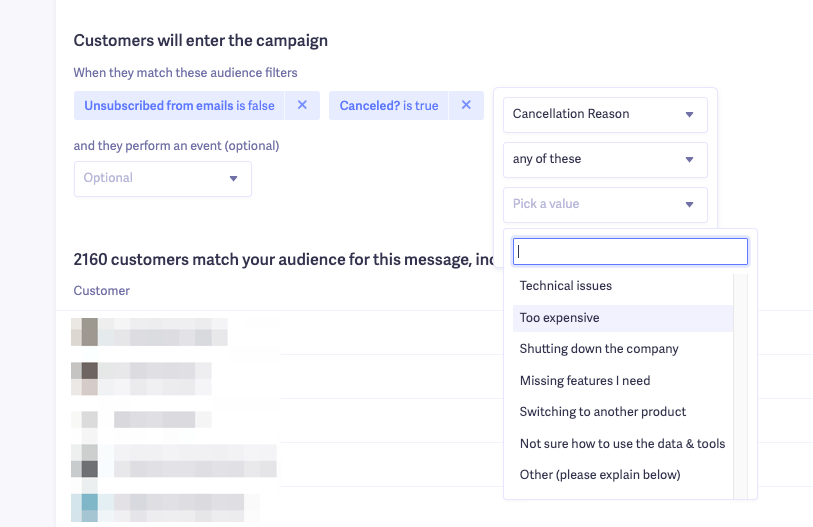
Here’s the important thing to keep in mind. You should create different emails for each cancellation reason.
For example, your email might ask customers who switched to a different product how the new product is working for them.
If their cancellation reason was that you’re missing a specific feature, you could include some of the new features you launched since the time they canceled.
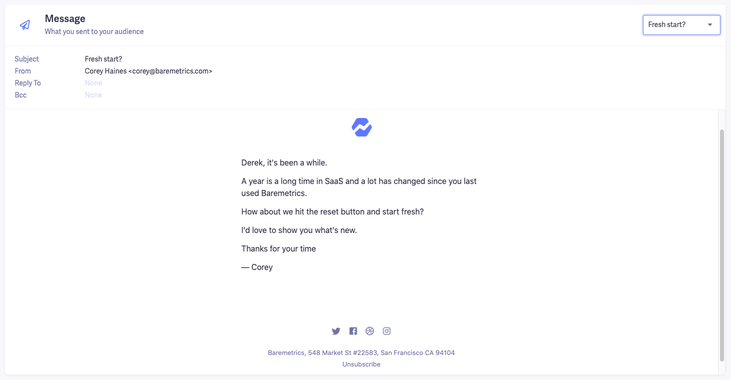
Or if there was no specific reason, you could send an email like this:
Then, just set when you want to send these emails.
If you need some ideas and inspiration for what to write in your email, check out these win back email templates.
Just because they canceled doesn’t mean it’s all over
Cancellation surveys can be an amazing way to improve your product, reduce churn and even save customers who are ready to cancel. You have to approach it the right way to get valuable info.
Keep your surveys simple, read the responses, and take action.