Table of Contents
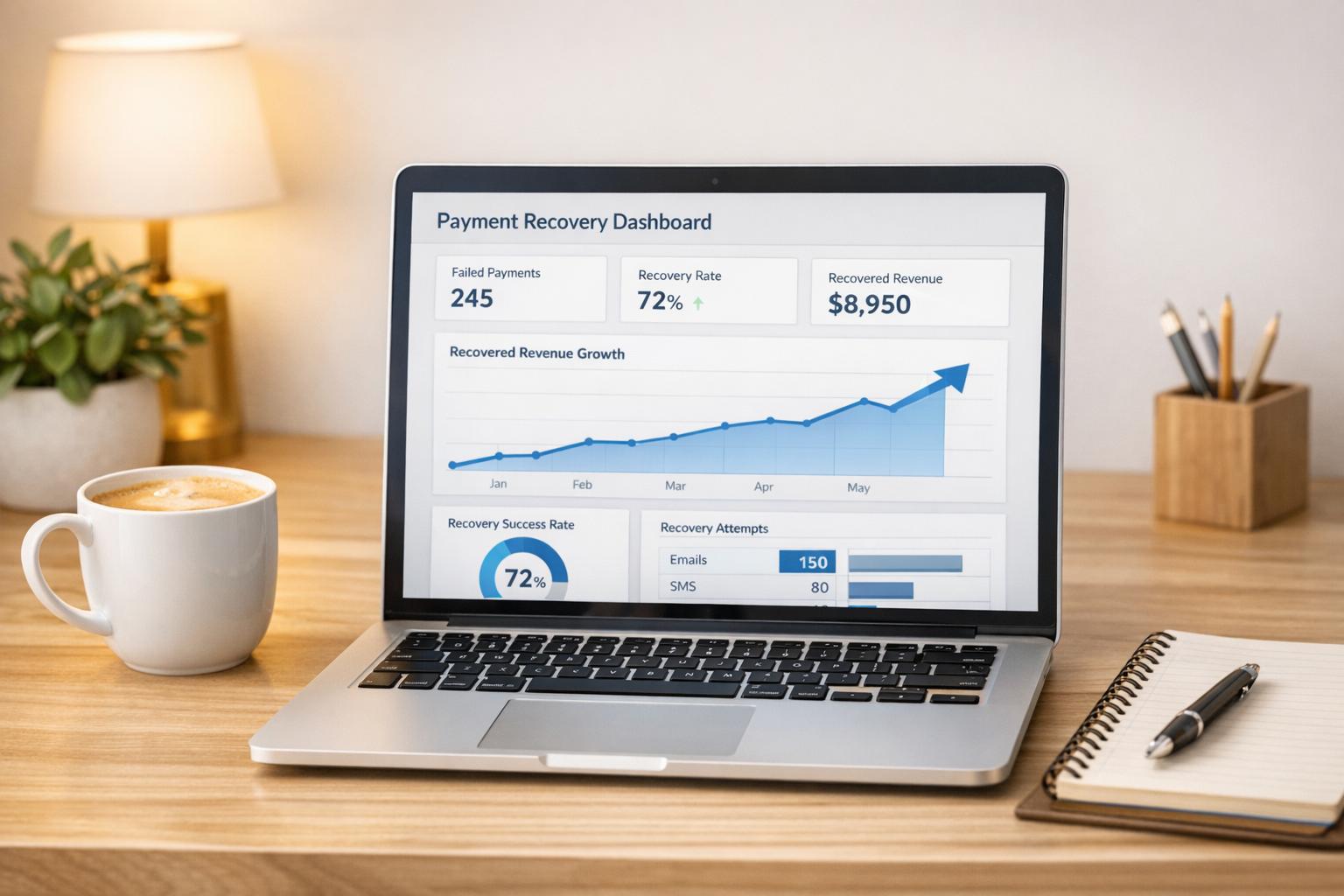
Subscription businesses lose around 9% of monthly recurring revenue to failed payments — typically the most recoverable revenue your business has. Across a sample of 119 US B2B SaaS companies using Recover for dunning automation in May 2026 (Baremetrics' 2026 payment recovery benchmarks), that recoverable revenue translated to about $1.24 million reclaimed in a single month, with the median company earning an 808% return on its Baremetrics subscription within that month. 95% of companies in the sample saw Recover pay for itself within month one. Here's how to actually do it:
- Automate recovery: Tools like Baremetrics Recover handle customer notifications while your processor runs the retries, saving time and revenue.
- Target soft and hard declines: Retry soft declines (e.g., network issues) automatically and address hard declines (e.g., expired cards) with personalized emails.
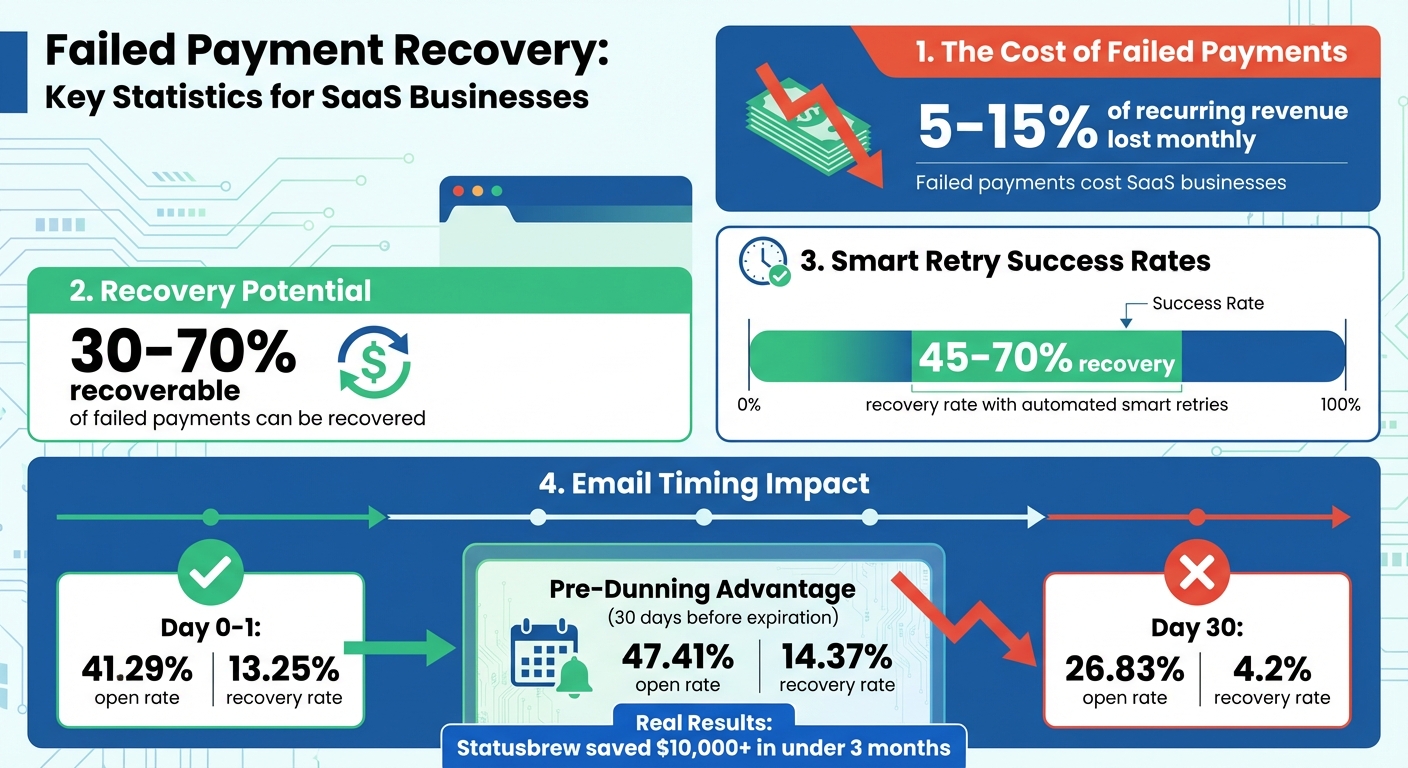
- Act fast: Send reminders within 24 hours for higher recovery rates - 41.29% open rate vs. 26.83% after 30 days.
- Optimize dunning emails: Use clear, empathetic messages with direct payment update links.
- Track key metrics: Monitor recovery rates, churn, and retry success to refine your approach.
Recovering failed payments protects your revenue, reduces churn, and boosts growth without the cost of acquiring new customers.
Failed Payment Recovery Statistics and Impact for SaaS Businesses
See the ROI of fixing failed payments.
How Do You Recover Failed Subscription Payments?
Baremetrics Recover
Stop losing customers to failed payments
Recover automates the follow-up when a charge fails: customizable email + SMS sequences, in-app reminders and paywalls, card-expiry reminders, and a branded card-update form customers can complete in seconds. No custom code required.
Start your free trial → See how Recover works
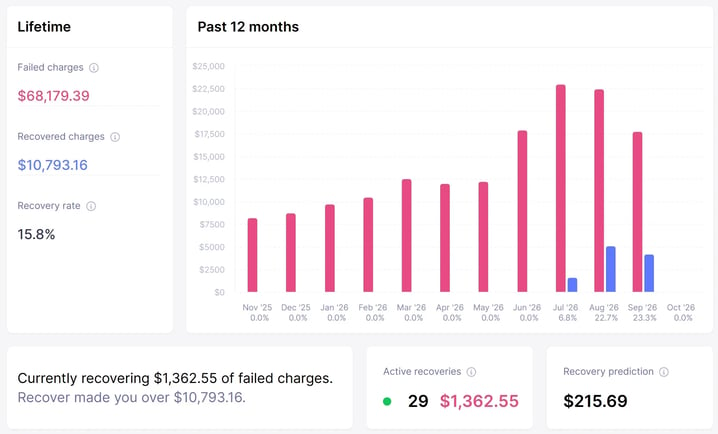
Screenshot shows sample demo data.
Automate Payment Recovery with Baremetrics Recover
Manually chasing down failed payments is a drain on both time and revenue. That’s where Baremetrics Recover steps in. It automates the customer side of payment recovery - from email reminders to in-app notifications - while your payment processor runs the retries, helping you reclaim lost revenue effortlessly. With seamless integration into payment processors like Stripe, Braintree, and Recurly, Recover transforms failed payments into a hands-free recovery system that works 24/7.
And the impact? It’s measurable. Statusbrew CEO Tushar Mahajan said:
"Recover helped us reduce our churn and save over $10k+ in less than 3 months"
That’s money going straight back into your business instead of slipping through the cracks. For a company generating $300,000 in Monthly Recurring Revenue (MRR), Baremetrics Recover costs about $499 per month. Plus, it comes with a no-risk guarantee: if the revenue it recovers doesn’t at least cover your Baremetrics subscription, you’ll get credited for the following month.
How Baremetrics Recover Works
Baremetrics Recover jumps into action the moment a payment fails. It identifies the type of decline - whether it’s a soft decline (temporary issues like insufficient funds) or a hard decline (issues requiring customer intervention, like an expired card). Then, it applies the right strategy for each case.
- Soft declines are left to your payment processor's retries (for example, Stripe Smart Retries), which are timed for when funds are more likely to be available, such as around payday.
- Hard declines trigger personalized dunning emails with secure links, guiding customers to quickly update their payment details.
All of this is tracked in an integrated dashboard, giving you a clear view of failed payments, their causes, and the recoveries made. For Stripe users, Baremetrics Recover works in harmony with Stripe Smart Retries, handling the customer emails while Stripe runs the retry attempts, to maximize recovery rates without overwhelming customers. This coordinated approach helps reduce involuntary churn while keeping your dunning process smooth and effective.
Setting Up Baremetrics Recover
Getting started with Baremetrics Recover is simple. Here’s how:
- Enable the Recover add-on in your Baremetrics dashboard. If you’re already using Baremetrics for analytics, it automatically syncs with your payment processor.
- Configure DNS settings to ensure dunning emails land in your customers’ inboxes, not their spam folders.
- For Stripe users, adjust Smart Retries settings to complement Recover’s dunning process for smoother coordination.
- Customize email templates and sending schedules based on customer segments and the type of payment failures.
- Install the Recover widget and JavaScript snippet in your app. This feature places in-app reminders and paywalls for delinquent users, reaching them when they’re actively using your product - at the ideal moment to prompt payment updates.
Payment Recovery Features
Baremetrics Recover is packed with tools to make payment recovery efficient and effective. Here’s what it offers:
- Works alongside smart retries: Your payment processor (for example, Stripe Smart Retries) schedules the retries at the most strategic times, like when funds are likely to be available, and Recover's reminders run around them.
- Customizable email templates: Personalize messages with customer names, reasons for payment failure, and clear calls-to-action. You can even A/B test subject lines and content to find what works best.
- Analytics dashboard: Track recovery performance in detail - by failure type, customer segment, and time period. Metrics like recovery rates, retry success percentages, and total reclaimed revenue help you fine-tune your approach.
These automated tools, combined with a well-crafted dunning strategy, ensure you’re recovering as much revenue as possible with minimal effort.
Build an Effective Dunning Process
What is Dunning?
Dunning is an automated system designed to address failed payments by notifying customers - typically via email - to update their payment details. Think of it as a polite reminder to resolve issues like expired cards or insufficient funds before customers lose access to your service. While automated tools handle payment retries in the background, dunning emails add a human touch by directly engaging customers.
Without a well-thought-out dunning process, you risk losing customers unintentionally. Often, customers don’t cancel on purpose; a simple billing issue left unresolved can lead to involuntary churn.
How to Write Dunning Emails
The tone of your dunning emails is key - they need to be clear, concise, and empathetic. Start with a friendly and non-confrontational opener. For instance, instead of saying, “Your payment failed,” try something like, “We noticed a small issue with your payment.” Clearly explain the problem (e.g., an expired card) and include the amount due along with a secure, one-click link to update payment details.
Personalization goes a long way. Address customers by name and mention their specific subscription or plan. To make resolving the issue as seamless as possible, provide multiple payment options, such as credit cards or ACH transfers. Keep your message brief but end on a positive note, emphasizing the value of your service and encouraging them to act quickly.
By following these tips, you can create emails that not only recover payments but also maintain a positive relationship with your customers.
Dunning Email Sequence Examples
A structured email sequence is essential for maximizing recovery rates. Timing is everything: sending the first email immediately - or within 24 hours - after a failed payment yields the best results. For example, immediate emails see a 41.29% open rate and a 13.25% recovery rate, compared to just 26.83% opens and a 4.2% recovery rate when sent 30 days later.
Here’s a proven 4-email sequence that can recover 45–70% of failed payments:
- Email 1 (Day 0): Send right away: “Your $29/month payment didn’t go through - update here.” Include a direct link for updating payment details and, if possible, specify the reason for the failure.
- Email 2 (Day 3): Follow up with a gentle reminder: “We tried processing your payment again, but let’s get you back to full access.” Provide the update link again.
- Email 3 (Day 7): Highlight the value of your service and consider offering a small incentive: “Don’t miss out on [specific features] - update your payment now and get 10% off your next month.”
- Email 4 (Day 14): Create urgency with a final notice: “Last chance before we pause your account - secure link inside.” Make it clear this is the last reminder before service is interrupted.
Space these emails 3–7 days apart and limit the sequence to 4–6 emails to avoid overwhelming your customers. For soft declines, like insufficient funds, timing retries around common paydays (e.g., mid-week) often yields better results. This combination of strategic timing and thoughtful messaging helps recover lost revenue while preserving customer trust.
sbb-itb-18a9912
Track and Improve Payment Recovery Performance
When you automate payment recovery, it’s just the beginning. To truly refine your process, you need to track performance and make adjustments based on the data.
Metrics to Track
Start by measuring your recovery rate - the percentage of failed payments successfully collected within a specific timeframe. This gives you a clear picture of how well your process is working. Equally important is tracking recovery by value, which focuses on the actual dollar amount recovered. A high recovery rate isn’t as impactful if it’s mostly low-value subscriptions being saved while high-value customers slip away.
Another critical metric is your involuntary churn rate, which highlights how many customers are lost due to unresolved payment issues. This figure reflects the financial impact of an ineffective recovery strategy. Keep an eye on your payment retry success rate to evaluate how well your automated retry attempts are performing. If the success rate is low, you may need to tweak the timing or frequency of retries.
Other metrics worth monitoring include:
- Time to recovery: How many days it takes, on average, to collect a failed payment.
- Automatic vs. manual recovery percentage: The proportion of recoveries handled by automation versus manual intervention.
- At-risk revenue: The total revenue tied to payments that have failed but remain unresolved.
Lastly, evaluate your recovery cost efficiency. Calculate this by dividing your total recovery costs by the number of payments recovered. If the cost per recovery is too high, it’s time to reassess your strategy. Segmenting your data by customer type, plan level, region, or billing method can also help you pinpoint specific problem areas.
Analyzing Recovery Data with Baremetrics
Baremetrics Recover offers a powerful dashboard to help you analyze your payment recovery performance. It tracks results over your lifetime or a rolling 12-month period, breaking down failed payments by reasons like insufficient funds, expired cards, or fraud prevention measures on the bank’s end. This detailed view allows you to identify where issues arise and adjust your approach accordingly.
You can also analyze the performance of each dunning email by reviewing open and recovery rates. For instance, if certain emails underperform, you can tweak the messaging or timing. Baremetrics tracks the average length of delinquency in days, helping you decide when to escalate from simple reminders to more assertive actions like in-app paywalls or direct communication.
The platform’s trend analysis helps you spot patterns in your recovery performance over time. Use these insights to fine-tune your strategy and improve your results.
How to Improve Your Recovery Process
Refining your recovery process based on data can significantly reduce churn and protect your revenue. For example, if you notice recovery rates dropping after day 15, you might add an extra email between day 7 and day 14 to re-engage customers before they fully disengage. Experiment with different subject lines, email content, and calls-to-action to see what resonates most with your audience.
Pre-dunning emails - sent 30 days before a card expires - are particularly effective. They tend to have a 47.41% open rate and a 14.37% recovery rate, outperforming emails sent after a payment failure.
In 2023, Statusbrew, under CEO Tushar Mahajan, used Baremetrics Recover to automate their dunning process. This move helped them save over $10,000 in lost revenue in under three months.
"Recover helped us reduce our churn and save over $10k+ in less than 3 months." - Tushar Mahajan, CEO, Statusbrew
Review your metrics each month and adjust your tactics as needed. If certain customer segments have lower recovery rates, create tailored email sequences for them. For high-value customers facing financial difficulties, consider offering payment plan options. The key is to let your data guide your decisions rather than relying on assumptions.
Conclusion
Key Takeaways
Failed payments are a tough hurdle for SaaS businesses, with failure rates hovering between 5% and 15% across the industry. But here’s the silver lining: you can recover about 30%–70% of lost revenue with the right strategies in place. The secret? A smart mix of automation, clear communication, and consistent performance tracking.
Automated payment retries are particularly effective for soft declines - temporary issues like insufficient funds or network errors. When timed well, these retries can recover an impressive 45% to 70% of failed payments. For cases of insufficient funds, syncing retries with common paydays can make a big difference, as highlighted by Adobe's VP at Subscription Show 2022. To tackle hard declines, such as expired cards, personalized dunning emails are key. These emails should clearly explain the issue and provide easy-to-use links for updating payment details.
It’s also crucial to keep a close eye on your metrics. Track recovery rates, involuntary churn, time to recovery, and at-risk revenue. Break down your data by customer type and reason for failure to uncover actionable insights. Reviewing these metrics monthly allows you to fine-tune your retry schedules, email strategies, and overall communication based on actual results - not guesswork.
Use these strategies as a roadmap to take immediate steps toward improving your payment recovery process.
Next Steps
Now’s the time to put these strategies into action. Start by implementing Baremetrics Recover to streamline your payment recovery workflow. This tool integrates seamlessly with your billing system, working alongside your processor's retries, managing dunning emails, and providing in-depth analytics to track your performance. Plus, its pricing is tied to your MRR and comes with an ROI guarantee.
Once that’s in place, set up your first dunning email sequence. Use concise, customer-friendly language with clear payment update links and alternative payment methods. Adjust your retry logic to focus on soft declines, timing retries strategically. Check your recovery dashboard weekly to identify what’s working and where tweaks are needed. Experiment with A/B testing on email subject lines and content to find the most effective combinations - especially since recovery rates tend to drop sharply after 15 days.
With these steps, you’re well on your way to reclaiming lost revenue and minimizing payment failures.