Table of Contents
SaaS founders usually start looking beyond Stripe's dashboard because they're tired of the same problems:
- Stripe doesn't do SaaS metric breakdowns well. You can see gross revenue and payouts, but not New MRR vs. Expansion vs. Churned MRR.
- You need churn by plan, not just total churn. Stripe doesn't break it out: no segmentation by plan, country, or billing cadence, anywhere.
- You don't have time to learn SQL or to prompt an LLM into writing it with you. You want a solution that tells you what's happening and helps you action your metrics. Stripe's answer to deeper analytics is Sigma, which requires SQL proficiency or a long back-and-forth with its AI assistant.
- You know you're losing revenue to failed payments, but you just don't know how much. Smart Retries retries the card, but there's no branded recovery campaign, and no visibility into what's at risk.
- You're stitching together three dashboards to get your metrics. Stripe can't normalize Apple, Google Play, or a second Stripe account into one MRR view.
To be clear up front: this isn't really a rivalry. Stripe is the payment layer. Baremetrics is the business intelligence layer built on top of it. Baremetrics is a Stripe Verified Partner, and most of our customers run on Stripe. But most SaaS companies hit a wall with Stripe's native reporting somewhere around $20–30K MRR, when they need cohort analysis, real segmentation, LTV by plan, or more robust revenue recovery.
Already know Stripe's dashboard isn't enough? Connect your Stripe account to Baremetrics free for 14 days. Setup takes about 30 minutes, and you'll see your full MRR breakdown, churn, and LTV the same day. Or explore the live demo first.
Baremetrics: Action Your SaaS Metrics to Grow Further
Baremetrics connects to Stripe in one click and turns raw payment data into the SaaS metrics you actually run the business on: MRR movements, churn, LTV, ARPU, and cohort data. All pre-built, in real time, with no SQL. It also does two things no Stripe product does in depth: recovers failed payments with your branding, and forecasts your runway from your actual books. Not only does Baremetrics function as your single source of truth, but also helps you action your metrics to grow your business further.
1. The full MRR picture
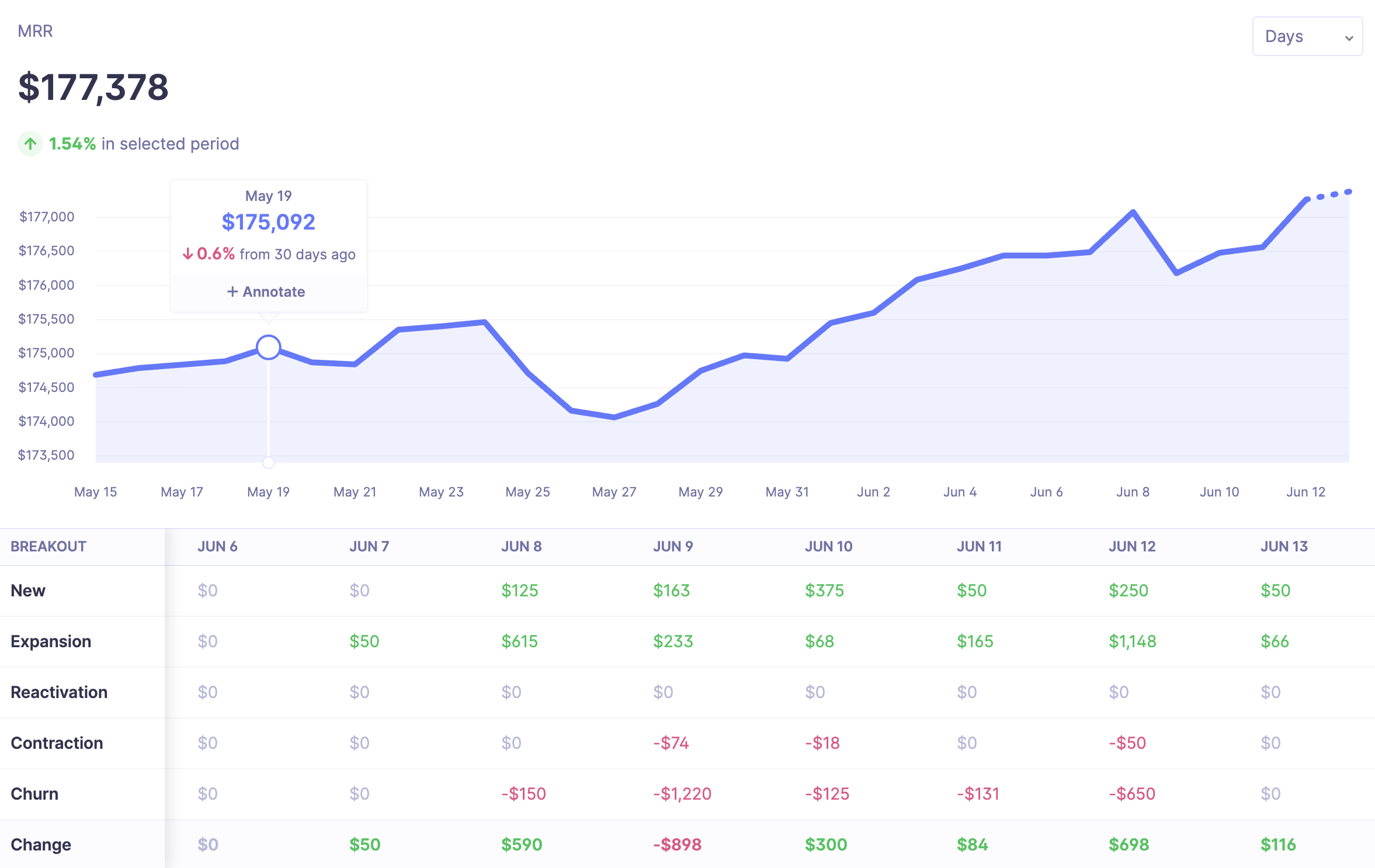
If you use Stripe Billing, Stripe does show you an MRR number. The problem is what it doesn't show: there's no breakdown into New, Expansion, Contraction, Churned, and Reactivation MRR — so you can see MRR moved, but not why. Stripe's MRR figure also drifts from actual recurring revenue, due to timezone normalization gaps, proration edge cases, and trial conversion handling.
Baremetrics re-processes your Stripe data specifically for subscription accuracy and gives you the full MRR waterfall out of the box. When your MRR dips $2K, you can see in one glance whether that was churn, downgrades, or a failed-payment spike — and click into the exact customers behind it.
2. Segment everything
![Segment by Plan Type [Screened in]](https://baremetrics.com/hs-fs/hubfs/Segment%20by%20Plan%20Type%20%5BScreened%20in%5D.png?width=749&height=356&name=Segment%20by%20Plan%20Type%20%5BScreened%20in%5D.png)
"Total churn" is nearly useless for decision-making. What you need to know is that your monthly plan churns at 3x your annual plan, or that customers from one acquisition channel have double the LTV.
Stripe's dashboard has no segmentation, and Sigma requires writing SQL for every cut. In Baremetrics, unlimited segments are built with filters, not queries: segment any metric by plan, billing interval, country, or any custom attribute you push in — then save segments to custom dashboards and apply them to cohort retention tables and LTV.
3. One MRR across multiple Stripe accounts (and Apple, Google, and more)
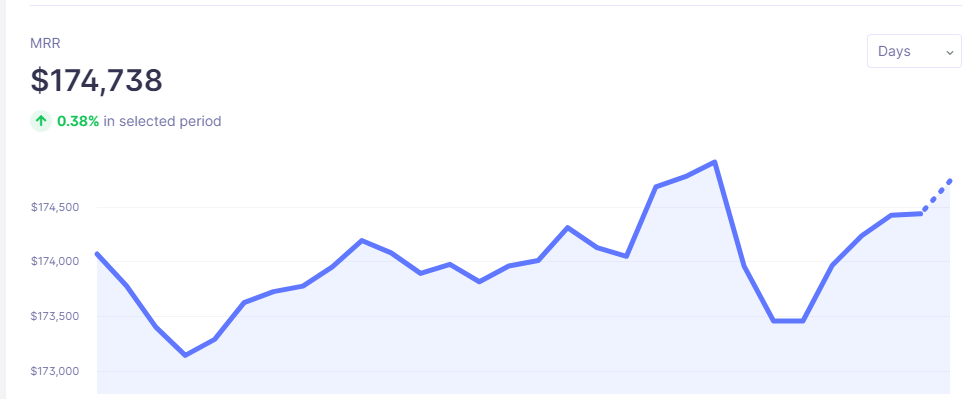
This is the wall Stripe can't climb by design: Stripe reporting only sees Stripe. If you run Stripe + Apple App Store + Google Play, or multiple Stripe accounts across products, regions, or brands, there is no native unified view.
One founder came to us running eight Stripe accounts with no clear picture of where the money was coming from.
Baremetrics connects multiple Stripe accounts plus Apple, Google Play, Braintree, Chargebee, Recurly, and Shopify — and normalizes everything into one unified MRR, with multi-currency conversion handled automatically. You can also compare sources, like Apple MRR vs. Stripe MRR, side by side. (One honest limitation: per-account breakdowns aren't available on every graph view. See the FAQ below.)
4. Recover: branded, multi-channel failed payment recovery
Stripe's Smart Retries is genuinely good at what it does (ML-optimized retry timing), and we recommend keeping it on. Stripe can also send basic failed-payment emails. But those are Stripe-branded templates with minimal copy control, email-only, with no sequenced campaign logic.
Recover adds the customer-facing layer Stripe doesn't have:
- Up to 7 fully customizable emails: your sender name, subject lines, copy, logo, and colors
- Pre-failure warnings: card expiration notices at 30 and 7 days, plus annual renewal reminders
- A branded billing widget: customers update their card directly to Stripe; Baremetrics never stores card data
- In-app banner → paywall: a configurable grace period that escalates to account lockout
- SMS recovery: a supplemental channel for customers with phone numbers on file
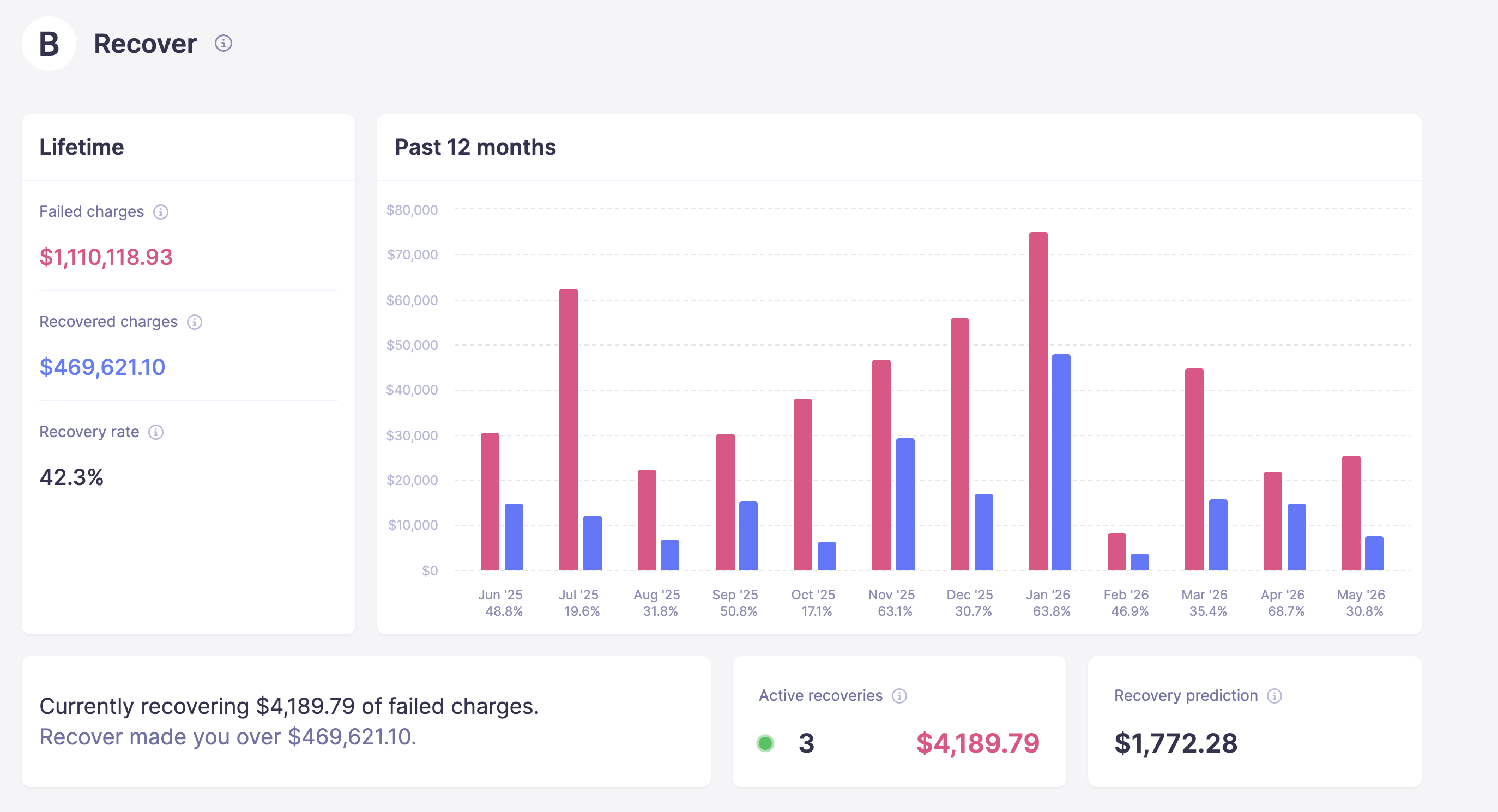
- A recovery dashboard: recovery rate, per-email open/click/recovery performance, revenue recovered
The results, from our internal May 2026 dataset of 133 active Recover accounts, speak for themselves with over $1,241,070 recovered in that month alone. And there's a guarantee: if Recover doesn't recover its own fee in failed charges, we credit your next month free.
5. Cancellation Insights: know why they leave — and save them at the door

Stripe's hosted customer portal can collect a cancellation reason (from a fixed list of eight) and dangle a generic coupon on the way out. But it only works in Stripe's portal. Cancel from your own app, and Stripe captures nothing. And the reasons land buried on individual subscription pages: no aggregate view, no filtering, no export.
Cancellation Insights works wherever your cancel button lives. It installs a widget that captures a reason before the cancellation goes through, reports on reasons in aggregate, and triggers reason-specific follow-up emails.
New in 2026: Retention Offers — present a save offer matched to the cancellation reason (e.g., a discount when someone selects "too expensive"), with the discount applied automatically to their Stripe subscription at the moment of cancellation intent. Setup takes about 30 minutes.
6. Forecast+: runway, burn, and P&L — not just payment history
![Forecast+ Dashboard [Stark]](https://baremetrics.com/hs-fs/hubfs/Forecast+%20Dashboard%20%5BStark%5D.png?width=749&height=329&name=Forecast+%20Dashboard%20%5BStark%5D.png)
Stripe can tell you what happened. Neither the dashboard nor Sigma can tell you where you're headed: there's no revenue modeling, runway calculation, or P&L view.
Baremetrics Forecast+ pulls your actuals from QuickBooks or Xero (or CSV), combines them with your live subscription data, and gives you runway, burn rate, CAC, and scenario planning. Model what happens if churn drops a point. Or if you raise prices 10%.
7. Support that gets on calls with you
Stripe's support model is self-serve docs and ticketed support, which is fine for a payments API, but rough when you're trying to reconcile metrics. Baremetrics comes with unlimited onboarding calls, ~2-minute chat response times, and hands-on working sessions where we'll build dashboards with you. Founders switching off spreadsheets or DIY setups often need a few trials before committing. We stay on calls the whole way.
What Stripe Analytics Actually Includes
Stripe's native reporting is more capable than many comparison posts admit, so let's be precise.
Stripe's default dashboard (free)
Included with every Stripe account: revenue overview (gross, net, refunds, disputes), payment volume trends, basic subscription counts, a top-line MRR figure (for Stripe Billing subscriptions), customer transaction histories, payment success rates, payouts, and Radar fraud tooling. Stripe's pricing tools are also excellent. Testing plans, trials, and discounts is fast.
What it does not calculate: MRR movement breakdowns, revenue vs. customer churn, LTV, cohort retention tables, ARPU trends, at-risk revenue, segmentation of any kind, or anything from non-Stripe sources.
Stripe Sigma (paid add-on)
Sigma is a SQL environment inside the Stripe Dashboard with access to every Stripe data object — subscriptions, invoices, charges, payouts. It includes pre-built query templates for common SaaS metrics, an AI assistant that writes SQL from plain English, scheduled queries emailed as CSV, and basic charts. Pricing is charge-volume based: from $10–15/mo (up to 250 charges) scaling to $450/mo at 25K charges.
Sigma's real limits: it requires SQL proficiency (or an analyst), it's Stripe-data only with no multi-source normalization, there are no pre-built KPI dashboards (you build what you get), and it does nothing for dunning, cancellation flows, or forecasting. Your queries are also Stripe-locked: switch billing providers and they're useless.
Stripe vs. Baremetrics: Capability Comparison
| Capability | Baremetrics | Stripe Dashboard | Stripe Sigma |
|---|---|---|---|
| Core SaaS metrics (MRR, churn, LTV, ARPU) | ✅ Pre-built, real-time | ⚠️ MRR only; rest must be built | ✅ Via SQL |
| MRR movement breakdown | ✅ Full waterfall | ❌ | ✅ Custom query |
| Cohort retention tables | ✅ Native | ❌ | ✅ Buildable in SQL |
| Segmentation | ✅ Unlimited, no SQL | ❌ | ⚠️ SQL group-by |
| Multi-source normalization (Stripe + Apple + Google…) | ✅ | ❌ Stripe-only | ❌ Stripe-only |
| Multiple Stripe accounts, one view | ✅ Pre-built | ❌ | ⚠️ Via Sigma for Organizations (SQL, paid per account) |
| Financial forecasting (P&L, runway, burn) | ✅ Forecast Plus | ❌ | ❌ |
| Failed payment recovery | ✅ Recover — branded, multi-channel, sequenced | ⚠️ Smart Retries + limited Stripe-branded emails | ❌ |
| Cancellation insights + retention offers | ✅ Add-on | ⚠️ Portal-only; 8 fixed reasons, generic coupon, weak reporting | ❌ |
| SQL / custom reporting | ❌ No SQL layer | ❌ | ✅ Full SQL access |
| Data warehouse export | ⚠️ Via Baremetrics Open API | ✅ Via Data Pipeline | ✅ Included w/ Data Pipeline |
| Setup | ~30 min, 1-click Stripe connect | Zero — built in | Requires SQL skill |
| Support | Unlimited calls, ~2 min chat | Self-serve / tickets | Self-serve |
Where Stripe Might Be a Better Fit
An honest comparison requires this section.
1. SQL-level custom reporting. If you have an analyst or data engineer, Sigma can query anything in Stripe's data model with total flexibility. Baremetrics has no SQL layer, but it does have an MCP, if you'd like to query your data.
2. Data warehouse integration. Stripe Data Pipeline syncs to Snowflake, Redshift, and Databricks directly, plus S3, GCS, and Azure storage (BigQuery via GCS). Baremetrics doesn't currently offer warehouse exports, but it does have an Open API to connect to other data sources.
3. Zero cost for basic reporting. Stripe's dashboard is free. If you're pre-revenue or genuinely only need payment visibility, it costs nothing. Baremetrics starts at $49/month.
Pricing: Stripe vs. Baremetrics
Baremetrics (scales with ARR; 35% annual discount across tiers; 60-day money-back guarantee):
- Launch: from $49/mo annual ($75/mo monthly), $0–360K ARR, single integration
- Growth: from $189/mo annual, $360K–3.6M ARR, two integrations
- Scale: from $749/mo annual, $3.6M+ ARR, unlimited integrations
- Add-ons: Recover $129/mo (scales with MRR) · Cancellation Insights $129/mo (Retention Offers included)
Stripe:
- Default dashboard: $0, included with every Stripe account
- Sigma: charge-volume based: $10/mo (annual) or $15/mo (monthly) up to 250 charges, $60/mo to 2,500, $225/mo to 10K, $450/mo to 25K; free in sandbox and with a Data Pipeline subscription
The honest read: Stripe wins on price at zero. The question is what your time is worth: founders routinely spend hours rebuilding in spreadsheets or SQL what Baremetrics delivers pre-built in 30 minutes.
When to Use Each
Use Stripe's default dashboard if you're pre-revenue or under ~$10K MRR, you only need payment volume and basic subscription counts, and you're comfortable with a free tool that will require manual work later.
Use Stripe Sigma if you have an analyst who knows SQL, you're already on Stripe Data Pipeline, and Stripe is your only payment source.
Use Baremetrics if you're at $10–30K+ MRR and need pre-built SaaS metrics without SQL; you run multiple payment sources or multiple Stripe accounts; you want forecasting (runway, burn, P&L from QuickBooks/Xero); you need branded, sequenced payment recovery beyond Smart Retries; or you want to know why customers cancel — and make them an offer before they do. And it's the pick if you want a support team that will actually get on calls and build with you.
And remember: this isn't either/or. Nearly every Baremetrics customer keeps Stripe. You're not replacing Stripe — you're finally seeing what's inside it.
Action Your SaaS Metrics
Stripe is indispensable for processing payments — but its analytics stop where SaaS metrics start. You won't find MRR waterfalls, cohort tables, LTV by plan, branded payment recovery, or runway forecasting in a Stripe dashboard.
Start a free 14-day Baremetrics trial — connect Stripe in one click and see your full metrics within the hour. Or poke around the live demo with real data first. Either way, you're covered by a 60-day money-back guarantee.