Table of Contents
A payment ledger is one of the basic tools of bookkeeping. It helps to record payments related to a specific purpose. This might be anything from a small project within a company to the full day-to-day cash activities of the entire company.
A ledger allows you to record the item when it is conceived and then update it upon payment, which means you don’t forget about upcoming items or forget to follow through on the payment of previous items.
Payment ledgers can be used to track the money that your company owes or the money that is owed to the company. For example, a landlord might keep a payment ledger to record when the monthly rent is paid. Conversely, the same landlord might also keep track of all their maintenance expenses on a separate payment ledger to make sure that they aren’t paying contractors late.
Baremetrics provides an easy-to-read dashboard that gives you all the key metrics for your business, including MRR, ARR, LTV, total customers, and more directly in your Baremetrics dashboard. Just check out this demo account here.
Connect Baremetrics to your revenue sources and start seeing all of your revenue on a crystal-clear dashboard. You can even see your customer segmentation, deeper insights about who your customers are, forecast into the future, and use automated tools to recover failed payments.
The dashboard even shows a livestream of all your payments coming in. In this way, it works as a payment ledger for your business.
Sign up for the Baremetrics free trial and start seeing more into your subscription revenues now.
What is included in a payment ledger?
A payment ledger includes everything you want and need it to. That might sound wishy-washy, but not every payment ledger needs to show all the same information, and not every bookkeeper needs to have the same information at hand.
Some people might be satisfied with the name of the company, the amount owed, and a checkbox to indicate whether the bill has been paid. Others may require all of that information, as well as an itemized list of everything included in the amount owed, the date the invoice was issued, the date the invoice was paid, the country of origin, a list of all previous transactions by the previous customer, etc.
What information is included might also be dictated by the Generally Accepted Account Principles (GAAP).
If you are using a payment ledger to collect $10 from everyone in the office for the annual birthday cake fund, you probably don’t need it to include much detail.
Conversely, if you hope to use the customer information you gathered for high-end data analysis, then collecting more information is always better—especially when it can now be done automatically without needless customer or employee time and energy.
The payment ledger can really be as simple or as detailed as you need it to be.
However, let’s look at some of the main items that can be included.
Client Name: This item will be on every payment ledger.
Purchase Amount: This is basic information that tells you how much your client needs to pay.
Payment Type: This can show you how the client paid (credit card, etc.) or which payment gateway they used (PayPal, etc.). This could be important to gather how much in fees you are spending, or whether one of your payment gateways could be dropped without hurting your overall MRR too much.
Associated Transactions: You could use this to keep track of other transactions performed by the same client. This might help you calculate your expansion MRR.
Order/Payment Dates: This can help you understand how long the delay is between when your service is ordered and the payment is received.
Group: On Baremetrics, you can set up groups based on anything to separate your clients into useful groups for data analysis. This might be based on country of origin, the pricing tier they’ve selected, the length of their contract lifetime, the size of the company, or even more exotic differentiating attributes.
Notes: Sometimes it is important to add small information about a client to their different transactions in the payment ledger. This can, for example, help jog your memory when it comes time to interact with the customer in the future. This information can be used to add a personal touch to emails.
Address: The customer’s address can also be important, especially if physical deliveries are going to be made.
Transaction Number: Giving each line in your payment ledger a unique number can help when tracking the transaction across variation spreadsheets, etc. If links get overwritten, sometimes a unique number is the fastest way to track down the original payment ledger entry.
Status: This could indicate whether the transaction has been completed, failed, paid, refunded, etc.
Why use a payment ledger?
While watching your bank account might be enough for an individual, the small discrepancies between the shown balance and the actual available funds increases with the number of transactions being made and can land a large, complex company in trouble.
For example, checks can take a week to show up on your bank statement, while credit card payments can be posted days later. With daily transactions numbering in the tens, hundreds, or even thousands, those discrepancies quickly add up.
If you are using multiple payment gateways, which also post transactions with a delay and take time transferring cash to your accounts where it can be used for operating activities, this issue is further compounded.
While a payment ledger doesn’t solve all the delays, it does help prevent the delays from getting you into trouble with overdraft charges, late payment fees, and all the other small costs that can really hurt a company’s profitability.
What is an example of a payment ledger?
The following is a simple example of a payment ledger:
|
Payment Ledger |
|||||
|
Transaction Number |
Due Date |
Customer Name |
Amount Due |
Notes |
Date Paid |
|
1 |
|||||
|
2 |
|||||
|
3 |
|||||
|
… |
|||||
While not particularly comprehensive, this simple payment ledger still gives you a lot of information. With a transaction number to attach this information to other sources, you can access further details elsewhere.
With both a due date and a date paid, you can see whether a payment has been made and, if so, whether it was on time. You can also see the value of the transaction and which customer made the order.
What are payment ledgers in SaaS?
For a SaaS enterprise, it is unlikely that you will have a physical payment ledger, although keeping track of important information with a pen and paper can still be helpful so don’t eschew such practices entirely.
For example, keeping track on a notepad of larger clients during their first few billing cycles, clients you are afraid might churn soon, or clients that have had credit card failures recently will remind you to take extra care to check on their payments when their subscription fee is due.
That being said, the majority of your payment ledger activities will be digital—and probably in the cloud. Your payment gateways likely provide a lot of information about transactions—successful or otherwise.
Accessing that information to arrange it in a visually appealing and easy-to-understand payment ledger can be difficult. That’s where Baremetrics comes in handy.
Using Baremetrics as a payment ledger for SaaS
Baremetrics can work as a payment ledger for your company. In addition to all its other amazing features, such as Baremetrics Recover to prevent failed charges or Cancellations to help you understand why customers leave so you can prevent it from happening, there is a live stream of your payments coming in.
All of these different tools function together to be a payment ledger for your business. The live stream can even filter out specific transaction statuses. For example, you can see only your new customers, customers that have upgraded, refunds handed out, or failed payments.
Using this information helps you make strategic decisions based on the status of the transactions.
Let’s take a look at some of these features:
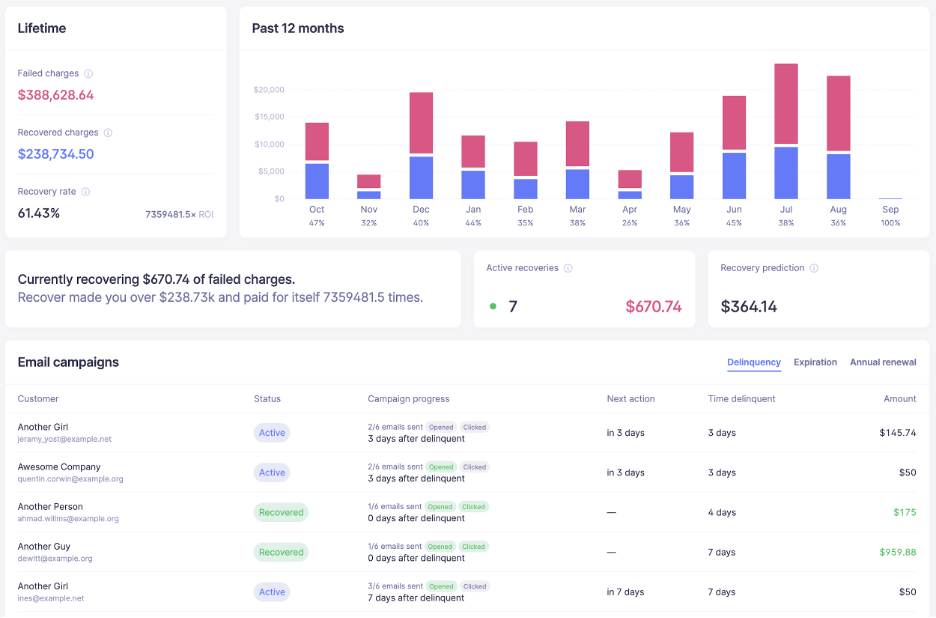
Figure 1. Baremetrics Recover helps your dunning operations by tracking down delinquent accounts and getting those lost payments.
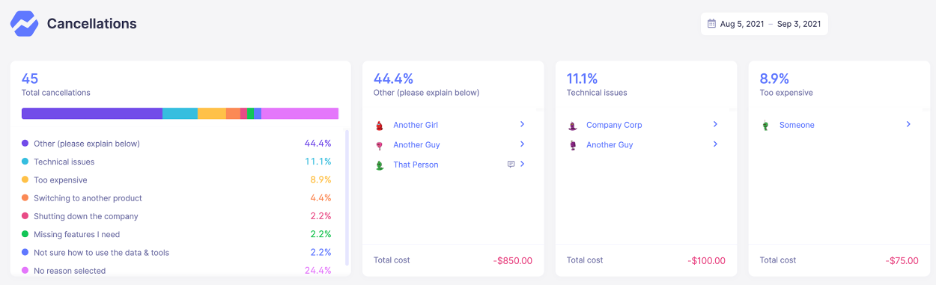
Figure 2. Baremetrics Cancellation gives you insights into why individual customers have canceled so that you can optimize your platform to prevent other customers from churning, winning back lost clients, or finding new users.
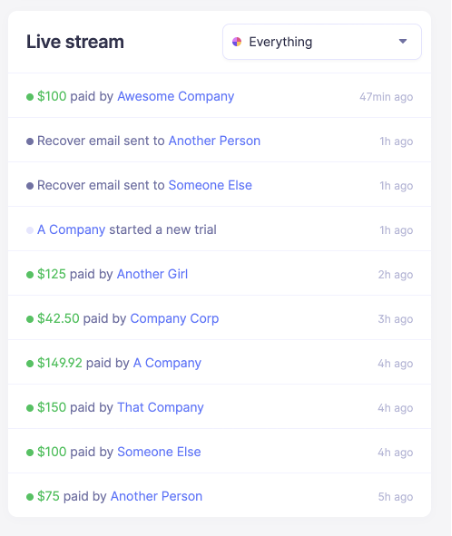
Figure 3.1
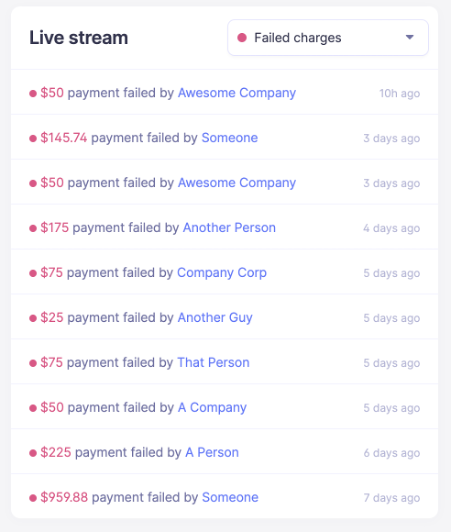
Figure 3.2
Figure 3.1 and 3.2 shows the live stream of all the transactions occurring on your platform. On the right we can see only the failed charges filtered. This can help give you the information needed to take strategic actions based on the status of the transaction.
Baremetrics monitors subscription revenue for businesses that bring in revenue through subscription-based services. Baremetrics can integrate directly with your payment gateway, such as Stripe, and pull information about your customers and their behavior into a crystal-clear dashboard.
Baremetrics brings you metrics, dunning, engagement tools, and customer insights. Some of the things Baremetrics monitors are MRR, ARR, LTV, the total number of customers, total expenses, quick ratio, and more.
Sign up for the Baremetrics free trial and start using it as your comprehensive payment ledger.
All the data your startup needs
Get deep insights into your company’s MRR, churn and other vital metrics for your SaaS business.