Table of Contents
Dunning management is the automated process subscription businesses use to recover failed payments — through retries, reminders, and customer communications — before those failures become permanent cancellations. Done well, it recovers revenue that would otherwise be lost to expired cards, declined transactions, and customer inattention, all without manual intervention.
Why it matters in one number: subscription businesses lose around 9% of their monthly recurring revenue (MRR) to failed payments. Across a sample of 119 US B2B SaaS companies using Baremetrics Recover, that translated to about $1.24 million in failed payments recovered in a single month (May 2026, Baremetrics payment recovery benchmarks). For 95% of those companies, Recover paid for itself within that month.
This guide covers every part of dunning management end to end: what it is, how the process works across three phases, how to write dunning emails that actually convert, how to measure recovery rate honestly, and what real Baremetrics customers have recovered using the approach we describe.
| Phase | Window | Primary actions | Recovery focus |
|---|---|---|---|
| Prevention | Before billing date | Card updaters, renewal reminders, pre-dunning warnings | Stop failures before they happen |
| Recovery | 0–7 days after failure | Smart retries, automated email sequence, in-app reminders | Recover most failures invisibly |
| Escalation | Day 8+ | Pause-vs-cancel, manual outreach for high-value accounts | Final resolution before permanent churn |
How failed payments signal upcoming churn.
What is dunning management?
Dunning management is the structured, usually automated, process of recovering failed payments from existing subscribers. It sits between your payment processor and your customer success function — handling the failed-charge events your billing system produces and turning them back into successful payments, before involuntary churn occurs.
In a recurring-billing context, dunning isn't a one-off transaction. It's a system. It has to be, because subscription failures happen for predictable reasons at predictable intervals, and recovering them at scale requires automation.
Why do subscription payments fail?
Most failed payments fall into three categories:
- Expired or cancelled card status. The most common cause. A customer's card hits its expiry date, gets cancelled and reissued by their bank (often after fraud detection), or is restricted to certain merchant categories. The customer typically doesn't realise the card has changed until something they pay for stops working.
- Insufficient funds or temporary decline. A short-term cash-flow issue, a daily-spending-limit trigger, or a fraud check by the issuer. These often resolve themselves within hours or days — which is why retry timing matters.
- Incorrect card details or geographic mismatch. Mistyped card numbers, mismatched billing addresses, or cards issued in countries your processor flags. Less common, but harder to fix automatically because they require customer action.
Understanding why a payment failed shapes what kind of recovery action will work. A card that's temporarily declined needs a smart retry. An expired card needs an email asking the customer to update their billing. A mismatched address needs a customer service touchpoint.
How Baremetrics tracks failed charges
Baremetrics records a failed charge whenever your payment provider attempts a charge that doesn't succeed. The Failed Charges page shows failed charges per day, how many customers are currently delinquent, and which customers are at risk because their cards expire soon. Customers who stay delinquent for more than 30 days are counted as cancelled (you can change that window in Data Settings), so unrecovered failures flow into MRR, user churn and revenue churn. Recover handles the customer side: it emails customers on your behalf, gives them a card-update page that doesn't need a login, and can prompt them inside your app. Payment retries stay with your processor.
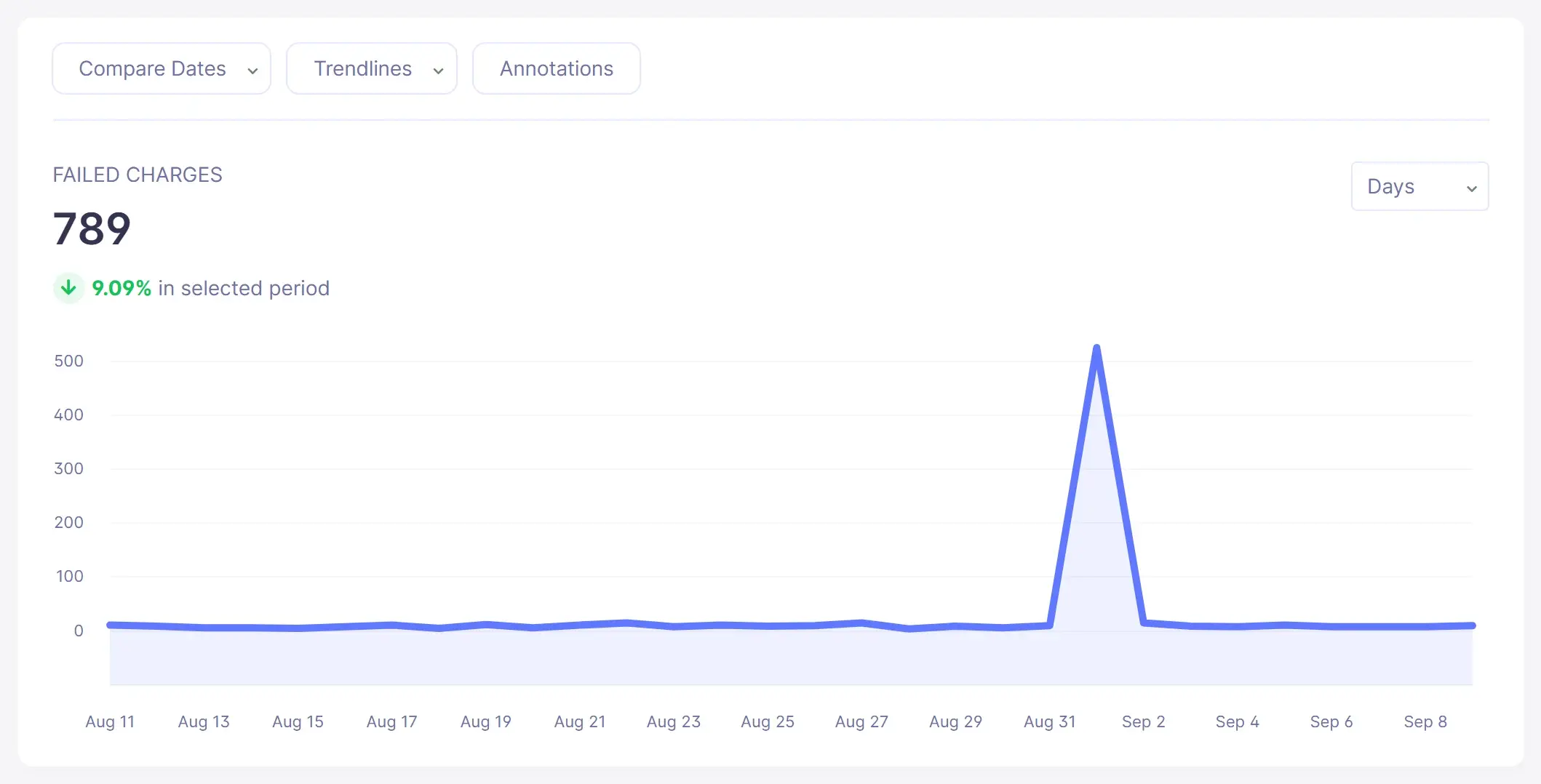
Screenshot shows sample demo data. Source: Baremetrics Help Center (Failed Charges, Cancellations and Downgrades, What is Recover?).
Why every subscription business needs dunning management
If you're running a SaaS, subscription DTC, or membership business, you almost certainly need dunning. Three reasons.
1. You're losing around 9% of MRR you could be saving
Based on Baremetrics data across hundreds of subscription businesses, the typical company loses around 9% of monthly recurring revenue to failed payments and the involuntary churn that follows. For a business with $100,000 in MRR, that's $9,000 a month — roughly $108,000 a year — walking out the door without anyone deciding to leave.
That number is the recoverable portion. A dunning management process — even a basic one — claws back most of it.
2. Involuntary churn is bigger than you think
Most retention work focuses on voluntary churn — the customers who actively decide to cancel. But research from Paddle suggests involuntary churn accounts for 20–40% of total churn in subscription businesses. These are customers who didn't decide to leave. Their payment failed, and nobody fixed it.
Voluntary and involuntary churn need completely different solutions. A customer who cancels because of a product issue needs a better product. A customer who churns because their card expired needs an email. Conflating the two is the most common mistake we see in subscription retention strategy.
3. Without dunning, you're disrupting service for customers who never wanted to leave
The customers who churn involuntarily are, by definition, customers who were paying you and using your product up until the moment their card failed. They're not unhappy with you. They didn't shop around. They just lost access because of an admin issue nobody bothered to flag.
The customer experience cost is real and underrated. Cutting service to someone whose card expired feels — from their perspective — like being penalised for a minor oversight. Dunning management isn't a collections function. It's a customer-success function in disguise.
The CX thesis: dunning done right is customer service
The reason most dunning tools underperform isn't bad retry logic. It's that they're built like collections tools — designed for finance teams to send to delinquent customers — instead of like customer service tools designed for CX teams to send to customers experiencing a problem.
This distinction matters. Recovery rate isn't an engineering problem. It's a tone-of-voice problem.
"Nobody wants to hear that their credit card has failed and they're delinquent on something. Because Recover is so easy to use and customizable, it allows our CX team to handle the payment recovery process instead of marketing, which customers seem to appreciate." — Matt Gartland, CEO, SPI Media (Smart Passive Income / SPI Pro)
The Smart Passive Income team uses Recover to handle dunning for their SPI Pro membership community. Matt's framing — that dunning belongs in CX, not marketing — is the difference between recovering a payment and losing a subscriber.
The framing isn't theoretical. Cancel Timeshare, another Baremetrics customer, runs a subscription service for people in financial hardship trying to exit timeshare contracts. Their customers are often dealing with serious financial stress when a card fails. As Cancel Timeshare's team puts it: "Money issues can understandably be a sensitive subject. Personalised messaging goes a long way."
For their audience, the difference between a CX-toned dunning email and a billing-toned one isn't cosmetic. It's whether the customer stays a customer at all.
Throughout this guide, we'll come back to this thesis: dunning is a customer-experience surface. Every choice you make about timing, copy, retry logic, and escalation should be filtered through "how would a customer experiencing a problem want to be treated."
The 3-phase dunning process
A modern dunning system runs in three sequential phases, each targeting a different point in the failed-payment lifecycle.
Phase 1: Prevention — stop failures before they happen
The cheapest payment to recover is the one that never fails. Prevention focuses on the upstream actions that reduce the failure rate itself.
Card updater services are the single highest-leverage prevention mechanism. Major payment processors — including Stripe — offer card-updater integrations that automatically refresh card details when a card is reissued, expired, or replaced by the issuing bank. Customers don't have to do anything. Cards stay current.
Pre-dunning communications handle what card updaters can't. A pre-dunning email or in-app notice sent 30 days before a card's known expiry date prompts the customer to update their details before any payment failure happens. For annual subscriptions, the right window is 30 days before renewal. For monthly, 3–7 days before the renewal charge.
Real-time monitoring of at-risk payments — using analytics platforms like Baremetrics — surfaces patterns that predict failure before it happens. Customers who've had previous failures, customers whose cards are nearing expiry, customers who've recently downgraded plans. Catching these patterns lets you intervene before the failure event.
Prevention won't eliminate all failures. But every percentage point of reduction in raw failure rate compounds across your customer base.
Phase 2: Recovery — the 0–7 day window after failure
When a payment does fail, the first week is where most of the recovery happens. The system you build for this window determines the bulk of your recovery rate.
The first dunning email within 24 hours. Recovery emails sent the same day as the failure outperform later ones by a wide margin. The issue is still fresh in the customer's mind. Their card is probably still on their desk. Make the update path one click.
A 6-to-7-email sequence over the next 30 days. A single email recovers a fraction of what a properly sequenced flow does. Most failed payments aren't ignored — they're missed. People are busy, emails get buried, and customers genuinely don't notice. Multiple touchpoints, spaced over weeks, catch customers at different windows in their attention.
Baremetrics Recover ships a 7-email sequence specifically designed for this window. The sequence runs from the day of the failure through to 13 days delinquent — the last email lands just before most subscription businesses lock customers out of the product at the 15-day mark. That late email is often the most valuable: it's the final chance to catch a customer before involuntary churn becomes inevitable.
Every email in the sequence is fully customisable — subject, body, send time, sender identity. That customisation isn't decoration. It's what lets the CX team own the tone instead of the billing system.
Recover also ships SMS as a first-class channel alongside the email sequence. SMS is best deployed for the later, higher-urgency steps in the cadence (typically day 7 onwards), when an email might be sitting unread but a text won't. Plain email-only dunning leaves recovery on the table for customers who simply don't check the inbox the failed-payment notification landed in — SMS catches them where they actually look.
Smart retry logic underneath the emails. Smart retries — sometimes called "invisible recovery" — use machine learning to time payment retries for the moments they're most likely to succeed. A card declined at 2pm on a Friday may go through cleanly at 9am on Monday, after the customer's payday clears. Naive retry schedules (every 3 days, every 5 days) miss this. Smart retries match retry timing to the customer's payment behaviour and the failure type.
Done right, smart retries recover a meaningful share of failed payments without the customer ever knowing there was a problem. That's the ideal outcome — the payment goes through, no email is sent, no friction is introduced. For temporary declines and bank-side issues, this is often the highest-converting path.
Personalised email content tied to failure reason. "Your card was declined" is a worse email than "your card was declined because the funds were insufficient — we'll retry on Tuesday" which is a worse email than "your card expires this month — here's the update link." Tailoring the message to the underlying failure reason lifts engagement and trust simultaneously.
Phase 3: Escalation — day 8 onwards
If the 7-day recovery window closes without resolution, the dunning process escalates. This is where the CX thesis matters most — escalation done badly is where customer relationships permanently break.
Pause vs. cancel. Instead of cancelling a subscription outright at day 8, transition the account to a "paused" or "delinquent — grace period" status. This keeps the customer's data and subscription history intact, makes reactivation a one-click affair, and lowers the emotional resistance to fixing the underlying payment issue. Customers who are cancelled feel ejected. Customers who are paused feel given a chance.
High-value accounts get personal outreach. For accounts above a meaningful revenue threshold — typically $50,000 ARR or higher — automated emails alone aren't enough. An account manager or customer success rep should reach out directly between days 5 and 7 of delinquency. The lift in recovery for high-ARR accounts from personal outreach is substantial, and the cost is negligible relative to the revenue at risk.
Customer segments that shouldn't be in the automated flow at all. This is a newer capability and worth flagging. As of April 2026, Recover supports excluding specific customer segments from dunning emails entirely — for VIP accounts, internal employee accounts, enterprise customers on manual billing, or any other segment where automated dunning would be inappropriate. The decision not to send a dunning email is sometimes the most CX-correct call you can make.
Hard cancellations only after 30–90 days. A subscription business that hard-cancels a customer at day 30 with no further attempts is leaving recoveries on the table. Many customers will resolve a payment issue at day 45 or day 60 if the option remains open. Set the hard-cancel threshold based on your data, not a default.
The core components of an effective dunning system
Underneath the three-phase process sit four technical components that need to work together.
1. Multi-channel notifications
Email alone reaches some customers. SMS, in-app banners, and (for some businesses) postal reminders reach others. The combination meaningfully outperforms any single channel.
The composition that tends to work:
- Email for the primary recovery sequence. Long-form, well-designed, includes the one-click update link.
- SMS for high-urgency reminders, especially in the late stages of the recovery window. Higher open rates, shorter format. Baremetrics Recover ships SMS as a first-class dunning channel — not a Twilio bolt-on — so you can layer SMS reminders into the same sequence as your email cadence with the same customisation controls.
- In-app banner or modal for active product users. Catches customers in the moment they're using the product they're about to lose access to — typically the highest-converting placement.
- Paywall at the appropriate delinquency threshold. Forces a resolution before continued use. Effective but should come late in the flow, not early.
Sending personalised, multi-channel notifications has been shown to reduce involuntary churn by up to 34% compared to single-channel email-only flows.
2. Smart retry logic
The retry logic that ships with most payment processors retries on a fixed calendar (day 3, day 5, day 7). That's better than nothing, but it treats every failed payment identically.
Smart retries use signals from the failure type, the customer's payment history, card-issuer behaviour patterns, and time-of-day data to predict the window where a successful charge is most likely. The retry happens in that window — not on day 3 by default.
The practical result: higher recovery rates with fewer retry attempts and less inbox noise for customers. For Baremetrics users, pairing Recover's email sequence with intelligent retry logic on the payment processor side gives a two-front strategy. The retry handles charge timing automatically. The emails keep customers informed and give them an easy path to update their billing.
3. Payment gateway and CRM integration
The dunning system has to know, in real time, when a payment fails. That requires direct integration with the payment processor — Stripe, Braintree, Recurly, Chargebee, Paddle, or whatever you're using.
It also benefits from CRM integration. Customer profiles, plan details, customer lifetime value, and account ownership all inform how an individual failure should be handled. A new $50/month customer in a free-trial conversion is different from a $50,000/year enterprise account. The dunning system should see both differently.
Baremetrics integrates directly with major payment processors and CRMs to provide a unified view of subscription revenue, surface failed payments in real time, and route high-value accounts to manual outreach automatically.
4. Customer-segment exclusion logic
Not every failed payment should trigger dunning. Some customers — VIPs, manual-billing enterprise accounts, internal users, customers in active hardship negotiations — shouldn't receive automated emails at all. As of 2026, Recover supports excluding customer segments from the dunning flow entirely, with mid-sequence exits if a customer becomes excluded after a sequence has started.
This isn't a minor feature. It's the difference between a CX-aligned dunning system and a billing-system-with-emails. Knowing when not to dun is as important as knowing when to.
How to write dunning emails that actually convert
The biggest source of underperformance in dunning systems is the emails themselves. Most templates default to a tone that reads like a debt-collection notice. Customers see them, feel attacked, and disengage. Or worse — they unsubscribe from your domain entirely.
A dunning email has one job: get the customer to update their billing details in fewer than two clicks. Every choice in subject, body, and call-to-action should serve that one outcome.
Subject line
The subject should signal the problem and the solution simultaneously. Three patterns that work:
- "Quick fix needed for your [product] subscription" — neutral, solution-oriented
- "Your card expired — here's a one-click update" — direct, but framed as a favour
- "Action needed: payment didn't go through" — clear, neutral, urgent without being threatening
Avoid: "FAILED PAYMENT", "OVERDUE", "URGENT NOTICE", "FINAL NOTICE". These are debt-collection patterns. They lower open rates with the customers who matter and raise unsubscribe rates with everyone else.
Body
Three sentences is often enough.
- What happened. "Your subscription payment didn't go through this month — looks like the card we have on file has expired."
- What to do. "You can update it in about 30 seconds using this link: [Update billing]."
- What happens next. "We'll automatically retry the charge once your new details are in. No further action needed."
Long emails are worse emails. Tone neutral, language plain, the call to action one click.
Send schedule
A standard cadence that works for most subscription businesses:
| Days after failure | Tone | Purpose | |
|---|---|---|---|
| 1 | Day 0 (within 24h) | Friendly | "Hey, your payment didn't go through" |
| 2 | Day 3 | Friendly | Gentle reminder, surface common reasons |
| 3 | Day 7 | Direct | Surface the consequence (paused service) |
| 4 | Day 10 | Direct | Account-level urgency |
| 5 | Day 13 | Direct | Last chance before lockout (lands before the typical 15-day cutoff) |
| 6 | Day 20 | Re-engagement | Account paused — offer help |
| 7 | Day 27 | Final | Final notice before hard cancellation |
That's Recover's default 7-step sequence. The 13-day email matters because most subscription businesses suspend access at day 15 — landing one more email before lockout catches a meaningful portion of customers who would otherwise churn.
A note on SMS in the cadence: text messages outperform emails on open rate, particularly for the later steps in the flow. If you're using Recover, the SMS channel slots into the same sequence as your emails — typically deployed for the day-7-and-beyond steps where email engagement starts to drop off. Treat SMS as an amplifier on the same cadence, not a separate flow.
For a deeper dive on dunning email copy (with 30+ real examples from SaaS companies), see our guide on how to write effective dunning emails.
Measuring recovery rate — the right way (and what most teams get wrong)
The single most misused metric in dunning is "recovery rate." Most teams define it loosely as "the percentage of failed payments we recover." That definition is misleading, and the misleading nature of it is why so many published industry recovery rates don't pass scrutiny.
The problem with naive recovery rate
If you measure recovery rate as recovered charges ÷ all failed charges, you're attributing credit (or blame) to your dunning system for situations it never engaged with. A customer whose card failed and was immediately excluded from your dunning flow — because they're in a VIP segment, in a manual-billing arrangement, or in active hardship negotiation — still counts as a "failed payment" in the denominator. So does a customer whose retry happened to succeed before your first email went out.
The result: your "recovery rate" is contaminated by failures that weren't really yours to recover.
Attempted recovery rate — the metric that actually means something
In June 2025, Baremetrics shipped a methodology update that separated this out. The current Recover metrics suite includes three figures:
- Attempted recovery charges — the count of failed charges Recover actively attempted to recover
- Attempted recovery amount — the dollar value of those attempts
- Attempted recovery rate — the percentage of attempted recoveries that succeeded
This is the metric that should appear in your dashboard, your board reports, and any external claim about dunning performance. It isolates the actual work the dunning system did, gives a clean per-attempt success rate, and stops you from blaming your system for failures it never tried to recover.
If you're benchmarking your dunning performance against any external number that doesn't specify whether it's attempted or naive recovery rate, the number is meaningless. Ask the source. If they can't answer, don't use it.
Other metrics worth tracking
- MRR at risk — the dollar value of recurring revenue currently tied to delinquent payments. Sized correctly, this number is the campaign your finance team can build around.
- Time-to-recovery — average days between failure and successful charge. Shorter is better; trends matter more than absolute values.
- Email engagement by step — open rate, click rate, and update-completion rate, broken down by email number in the sequence. Usually reveals which emails are pulling weight and which are filler.
- Recovery rate by failure reason — expired cards recover differently from insufficient funds, which recover differently from geographic mismatches. Slicing recovery rate by failure reason surfaces where to focus optimisation effort.
- Recovery rate by customer segment — high-ARR customers recover at different rates from low-ARR. Annual subscribers recover differently from monthly. Surface the slices.
A dashboard with these five metrics, updated monthly, is the operational layer that turns dunning from a fire-and-forget setup into a continuously improving system.
Six best practices for dunning management
Distilled from years of running dunning campaigns across hundreds of subscription businesses.
1. Get pre-dunning right
Pre-dunning — warning customers about cards expiring before they expire — is the highest-leverage prevention move. Customers don't notice their own card expiries. Tell them, 30 days out. The recovery is on the prevention side; the dunning is the fallback.
2. Automate everything — but customise the emails
The send schedule, the retry logic, the escalation rules, the exclusion segments — all automated. The content of each email — branded, customised, written in your CX voice. Automation handles the cadence. Customisation handles the relationship.
3. Layer smart retries on top of fixed cadences
Don't pick smart retries OR fixed-schedule emails. Run both. The smart retries handle invisible recovery (cards that just needed time). The emails handle visible recovery (customers who need to act). They're complementary, not alternatives.
4. Make billing updates frictionless — two clicks maximum
The cost of friction at the update step is recovery. If updating a card takes more than two clicks, you're losing customers who would have paid. Use hosted payment-update URLs (Recover ships one) instead of forcing customers through your full account portal. Mobile-first design matters here — half of dunning email opens happen on phones.
5. Track and segment by attempted recovery rate
Not naive recovery rate. Attempted recovery rate, segmented by failure reason, customer segment, and email step. The segments tell you where to focus optimisation effort.
6. Exclude customers who shouldn't be in the flow at all
The newest best practice, and the one most teams haven't yet adopted. Some customers genuinely shouldn't receive automated dunning emails — VIP relationships, manually billed enterprise contracts, customers in active CSM hardship conversations. The right move is to exclude them from the automated flow entirely and handle them in a separate workflow. Recover supports segment-based exclusions as of April 2026.
Real results: what three Baremetrics customers recovered with Recover
Dunning recovery is a numbers game. Here's what the numbers look like for three real subscription businesses using Recover — across three different time windows and three different use cases.
Cancel Timeshare — $686 recovered in month 1
Cancel Timeshare is a small Stripe-native subscription service helping people exit timeshare contracts. They started using Recover in March 2021 and, within the first month, recouped over $686 in failed payments.
"Within the first month of using Recover, it more than paid for itself. It's definitely impressive." — Charles Howard, President, Cancel Timeshare
For a small subscription business, that month-one outcome is the proof case: Recover doesn't require scale to deliver ROI. It works immediately, even on a modest customer base.
SPI Pro / Smart Passive Income — $8,300 recovered in year 1
SPI Pro is the application-based membership community Pat Flynn launched on top of his Smart Passive Income media business. The SPI team uses Recover specifically because they need branding and timeframe control over their dunning emails — the standard Stripe-billing dunning didn't fit their voice.
"I will always sing Stripe's praises, but we weren't impressed with the results of its dunning software. Having increased control with Baremetrics is essential. We're able to include SPI branding and change timeframes really easily with Recover." — Matt Gartland, CEO, SPI Media
Over 12 months, Recover recovered $8,300 in lost revenue from SPI Pro members — paying for itself 8.9 times over in that period.
Grokability — $150,000 recovered over 3 years
Grokability (makers of Snipe-IT, the open-source asset management platform, and GoodForms) is a B2B SaaS run founder-led by Alison Gianotto. They added Recover to their Baremetrics subscription because, in Alison's words, it let them handle "both analytics and dunning processes under one roof."
The compounding ROI from a long-running Recover deployment is the story:
"Grokability has recovered more than $150,000 in lost revenue in the last 3 years."
That's the long-horizon case. Recover doesn't just recover payments — it compounds. A B2B SaaS at scale, running Recover continuously, generates six-figure revenue recovery over multi-year windows.
Three customers. Three time windows. Three different use cases. Recover pays for itself in month one, recovers thousands within year one, and compounds into six-figure recovery over time.
The bigger picture — $1.24M recovered in a single month
The three customer stories above are individual proof. The aggregate tells a wider story.
In May 2026, across a sample of 119 US B2B SaaS companies actively using Baremetrics Recover, the tool recovered about $1.24 million in failed payments — in that single month (see the full benchmarks report).
Breaking the aggregate apart:
- 95% of companies in the sample saw the tool pay for itself within that single month
- 65% of companies saw 5× ROI or better in the same month
- 42% of companies saw 10× ROI or better
The customer base skews heavily toward Stripe-native subscription businesses. Of the 119 companies in the sample, 94% were running their billing on Stripe — either Stripe-only or Stripe alongside another processor. This isn't a coincidence. Stripe-native businesses tend to hit the ceiling of what Stripe Smart Retries alone can recover. Recover is the layer above that catches what Stripe doesn't.
If you're operating a subscription business and you don't have a structured dunning process in place — or you have one but you're not measuring attempted recovery rate — you're almost certainly losing recoverable revenue. The 9% of MRR that failed payments typically cost a subscription business doesn't come back unless something is set up to claw it back.
Dunning software comparison
Most subscription businesses face a choice: use the dunning capability that ships with their payment processor, or layer a dedicated dunning tool on top. The trade-off is real.
Payment-processor dunning (Stripe Smart Retries, Recurly, Chargebee)
Built into the billing system. Default-on. No extra configuration if you're already using the processor. Free or bundled into existing subscription costs.
Limitations: limited customisation of email content, send timing, branding, and tone. Limited reporting on which interventions are working. No segmentation logic for excluding customers from the flow. The tone defaults to billing-system-friendly, which often reads as collections to the customer.
Best for: businesses willing to accept the defaults and able to live without segmentation, customisation, or CX-voice control.
Recover by Baremetrics
A dedicated dunning layer that sits on top of Stripe (or Braintree, or any subscription billing system). Designed around the CX thesis — dunning as customer service, not collections.
Key capabilities:
- 7-email customisable sequence spanning day 0 through 27 days delinquent, with the 13-day email landing before the typical 15-day lockout threshold
- SMS dunning as a first-class channel alongside email — layered into the same cadence with the same customisation controls
- In-app reminders and paywalls triggered by JavaScript snippet
- Hosted payment-update URL — frictionless one-click update flow for customers
- Customer-segment exclusion (April 2026) — exclude VIPs, enterprise, or hardship-flagged accounts from automated dunning entirely
- Attempted recovery rate metrics (June 2025) — the methodologically honest measurement of dunning performance
- Direct integration with Stripe, Braintree, Recurly and Chargebee (Chargebee only where customer email addresses are collected) + CRM integrations
- Full branding control — your colours, your logo, your voice
- Per-email analytics — open, click, recovery breakdown by step in the sequence
Best for: businesses that want their dunning tone owned by CX, not billing. Stripe-native businesses that need more than Smart Retries alone delivers. Subscription businesses operating at scale where the compounding ROI of a dedicated dunning layer justifies the subscription cost.
Grokability's long-running result is on the higher end. In the May 2026 benchmark sample, the median company earned an 808% return on its Baremetrics subscription in a single month (payment recovery benchmarks) — still meaningful, and the typical expectation.
Start a free trial of Baremetrics Recover →
Baremetrics Recover
Stop losing customers to failed payments
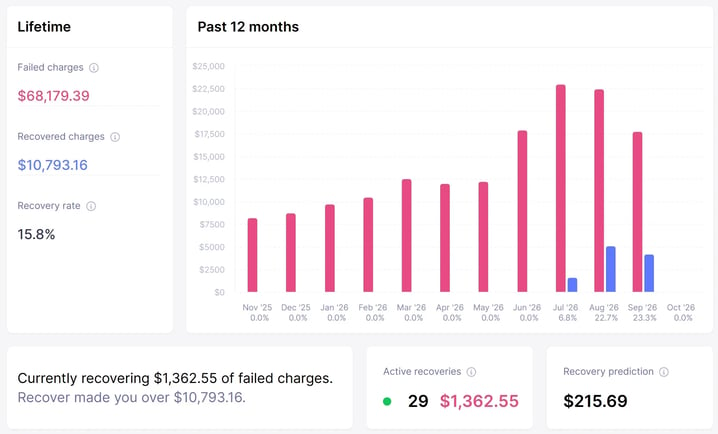
Recover automates the follow-up when a charge fails: customizable email + SMS sequences, in-app reminders and paywalls, card-expiry reminders, and a branded card-update form customers can complete in seconds. No custom code required.
Start your free trial → See how Recover works
Screenshot shows sample demo data.
FAQ
What is dunning?
Dunning is the structured process subscription businesses use to recover failed payments — usually through a combination of automated payment retries, customer email reminders, in-app notifications, and (when needed) personal outreach. It sits between your payment processor and your customer success function, turning failed-charge events back into successful payments before they become permanent cancellations.
What is a dunning letter or dunning notice?
A dunning letter (or dunning notice) is a communication sent to a customer informing them that a payment has failed and asking them to take action — typically updating their billing details. In modern subscription businesses, "letter" almost always means email or in-app notification. Effective dunning notices are short, neutrally toned, and contain a one-click update link.
What is the dunning process?
The dunning process is the sequence of actions a business takes after a payment fails, designed to recover the payment before involuntary churn occurs. A complete dunning process runs across three phases: Prevention (card updaters and pre-expiry reminders before failure), Recovery (smart retries and an email sequence in the first 7 days after failure), and Escalation (pause-vs-cancel logic and personal outreach for high-value accounts beyond day 7).
How long should a dunning sequence run?
A standard sequence runs 6–7 emails over 27–30 days, with the cadence weighted toward the first two weeks. Recover ships a 7-email sequence by default, with the final email landing at 13 days delinquent — just before most subscription businesses lock customers out at day 15. Hard cancellation should generally come no sooner than day 30 to leave room for late recoveries.
What's a good dunning recovery rate?
A "good" recovery rate depends on which metric you're measuring. Naive recovery rate (recovered ÷ all failed charges) is misleading because it includes failures the dunning system never attempted. The right metric is attempted recovery rate — the percentage of attempts that succeeded. Industry averages vary widely; what matters more is the trend over time and the segmentation by failure reason and customer cohort.
Why are subscription payments failing?
Subscription payments fail for three main reasons: expired or cancelled cards (the most common, often happens after fraud-prevention reissues by the bank), insufficient funds or temporary declines (typically resolve within hours or days), and incorrect card details or geographic mismatches (typing errors, address mismatches, country restrictions). Smart retries handle most insufficient-funds failures invisibly. Expired cards and detail errors require customer action — which is what dunning emails are for.
How do I recover failed payments?
To recover failed payments at scale, you need three things: (1) a payment processor with smart retry logic that times retries for maximum success probability, (2) a multi-step dunning email sequence (typically 6–7 emails over 30 days) with a one-click billing update link, and (3) an escalation path that pauses (rather than cancels) high-value accounts and triggers personal outreach for the largest customers. Doing all three together — rather than relying on any one alone — is what moves recovery rate materially.
How do I reduce involuntary churn?
Involuntary churn is reduced through prevention plus recovery. Prevention includes card updater integrations, pre-expiry email warnings (~30 days before card expiry), and real-time monitoring of at-risk accounts. Recovery includes smart retries, multi-channel dunning communications (email + SMS + in-app), and customer-segment-aware escalation. Done well, this combination can reduce involuntary churn by 30–50% relative to no system at all.
When should I pause a subscription versus cancel it?
Pause for any customer where the payment failure looks like inattention (expired card, missed reminder) rather than active disengagement. Pausing preserves customer data and subscription history, makes reactivation a one-click affair, and feels less punitive than cancellation. Hard cancellation should typically only happen after 30 days of failed recovery attempts, and even then, only for customers who haven't engaged with any recovery communication.
What's the best dunning management software for Stripe billing?
For Stripe-native subscription businesses, Baremetrics Recover is purpose-built for layered dunning on top of Stripe — handling the email sequence, in-app reminders, branding control, customer-segment exclusion, and attempted-recovery-rate reporting that Stripe Smart Retries alone doesn't cover. Stripe Smart Retries handles the invisible retry layer well. Recover handles everything that requires customer-facing communication and CX-led tone. In a May 2026 sample of 119 US B2B SaaS companies using Recover, 94% were running Stripe.
Dunning management is non-negotiable for subscription businesses
If there's one takeaway from this guide, it's this: dunning is not a collections function. It's a customer-success function with billing infrastructure underneath.
The companies that treat it that way — that design the emails for CX, measure the attempted recovery rate honestly, exclude the customers who shouldn't be in the flow, and pause rather than cancel — recover materially more revenue and lose materially fewer customers.
We've watched Recover recover over $30,000 in lost revenue for Baremetrics itself over a nine-month window. We've watched 119 companies in our May 2026 benchmark sample recover $1.24 million in a single month. The opportunity is real, the math is real, and the tooling exists.
If you're running a subscription business and you don't have a dunning management process in place — or you have one but you're measuring it with the wrong denominator — you're leaving recoverable revenue on the table every month it goes unaddressed.