Table of Contents

A month ago we were knee deep in server issues that caused sporadic data issues, outages and performance problems for nearly every customer over the course of a full week. It was intensely frustrating for our team not only because it was a really hard problem to get to the bottom of, but more importantly, because it meant our customers weren’t getting the service they deserved.
Handling these types of issues can be touchy, especially when the issues aren’t necessarily affecting every customer.
Do you show a notice to all customers, even if only a random 50% are having issues? Do you share everything that’s happening? Or only when there’s significant progress? What should the tone be? Should offer refunds?
Obviously there are a multitude of variables that might come into play, here’s how we generally handle outage and server interruptions and how we like to communicate to our customers during those times.
Escalation procedure
Ideally you’ve got some sort of system monitoring in place. On a basic level, that can be done with a simple ping to make sure a given URL is accessible. On a deeper level, monitoring things like database load, application errors and response times can go a long way to catching things before they’re actually a noticeable issue to your customers.
In addition to system monitoring, if you have more than one engineer, having an on-call schedule is worth your while. Pinging every engineer whenever there’s a problem is nerve-racking and not a great use of anyone’s time.
The combination of those two things lets you put a solid escalation procedure in place.
Step 1: General chat notification
When a potential issue comes through the door, whether that’s via system monitoring or customer support, it’s first reported to our #backend channel in Slack, @-mentioning all engineers. Since our engineers are spread across multiple timezones in various parts of the world, most hours of the day someone is online.
It’s preferable for someone who’s actually awake to handle an issue instead of having to wake someone up.
If an engineer is online, they can confirm if it’s an issue or not and keep the process moving.
Step 2: Text message
If there’s no engineer online and the issue appears to be critical, system monitoring kicks in most of the time and will text message the on-call engineer who, awake or not, will hop on and begin working on the issue.
Step 3: Call
In the scenario where system monitoring didn’t pick up the issue or a text message clearly didn’t work, then whoever did notice the issue (usually someone in Customer Support) will call the on-call engineer.
Usually after all of this, someone has been made aware of the problem and is working on a fix.
Communicating the problem
Once you’ve verified that there is indeed an issue, post a status message. Our preferred approach is to have everyone see the status message as soon as possible instead of waiting and trying to just notify a smaller group of people.
The reason for that is it’s usually too difficult to pinpoint the extent of an issue at the start. We’d rather tell everyone that there might be an issue, even if they aren’t experiencing it, than leave a customer wondering if something is going on. Our personal rule of thumb is to be open and honest right from the start.
We find you can’t over-communicate these things.
We start by posting to our status page, which also posts to our Twitter account and creates a message within the Baremetrics dashboard.
Support during an outage
When there’s an outage or interruption, our primary goal is to communicate and reply to customers as fast as possible. That means our support team puts higher priority on tweets, emails and tickets relating to the outage.
The less time our customers have to spend wondering if something is wrong and when it will be fixed, the better.
In our outage a month ago, after we’d had nearly a week of sporadic ups and downs, we decided responding to incoming inquiries about the outage wasn’t enough. I actually sent out a “Letter from the CEO” to all of our customers. Enough people had experienced issues that me blanket-updating everyone and laying out what had happened and how we were fixing it felt necessary. Again, communication is the key to keeping your customers trust and thereby their business.
As you’ve likely noticed, over the past week there have been a number of issues with your dashboard. You’ve probably seen drops in certain metrics (which would cause spikes in others). Usually you’d notice them in the mornings.
First off, I’m sorry. Seriously. Few things spike my stress level more than our customers not seeing the data they expect and deserve.
Ultimately these issues have boiled down to our servers getting behind on calculations as we’ve nearly doubled the number of data points we process in the past few weeks.
There’s a sequence of events that happen to import, process and calculate any given metric and when one thing gets behind it can sometimes cause a bit of a domino effect which causes other numbers to get behind.
Second, we’ve been working day and night to tackle this and improve processing speeds as well as bringing new servers on line to help with the backlog.
We’ve actually been working the past few months on an entirely new infrastructure that scales orders of magnitude more efficiently than our current set up and we’ll begin rolling that out in the next two weeks (more info about that coming soon).
At the end of the day you trust us with your business data to help you make accurate business decisions and when we don’t meet those expectations it’s simply not okay.
Our hope is to be fully caught back up on processing in the next 24 hours.
If you have any questions at all, just reply to this note. Happy to answer or listen to any questions and concerns.
After the storm
Once you’re past the outage, write up a postmortem. Include an overview of what happened, when it happened, how it happened and what you’re doing to prevent it from happening again.
The reality is, most customers won’t read this. They’re just not that interested in the meaty details. However, for the customers that do care about it…they really care about it and it will go a long way to re-establish trust in your product.

What about refunds for the downtime?
We don’t do automatic refunds for downtime. The only time you should preemptively issue refunds to everyone is if you have a service level agreement (SLA) in place that guarantees a certain level of performance or uptime.
Now, that being said, you also shouldn’t be stingy. If someone is clearly upset by the downtime, offer them a full refund for the past month. Unquestionably worth it.
Bearing the weight of customer frustration
Usually you and your team care a lot more about an outage than your customers. Yes, it will annoy and frustrate them, but the stress you feel is essentially the weight of all your customers frustrations. It can be pretty intense.
Resist the impulse to micromanage. Stay focused on keeping your customers informed and let your engineering team do their job.
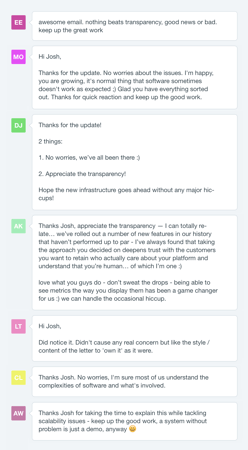
We’ve found the large majority of customers are understanding of server issues. That “Letter from the CEO” I sent to nearly 800 people resulted in exactly two people who were frustrated. The rest of the responses were incredibly supportive and gave a nice pick-me-up to me and the team.
Tools
Here are some of the tools we use or have used over the years to help manage every part of this process:
- StatusPage — Powers our status page and in-app notifications
- Honeybadger — Error & uptime monitoring and notifications
- PagerDuty — On-call scheduling and escalation procedures
- Datadog — Infrastructure monitoring and alerts
- Intercom — Email, chat and general support during outages