
SaaS metrics formulas: ARR, NRR, GRR, churn, quick ratio and burn multiple
This page gives a one-sentence definition and the exact formula for the core SaaS revenue metrics, explains how Baremetrics calculates each one from your billing data, and links to a full guide and, where there is one, a free calculator. For which metrics to track first, see 11 SaaS metrics that drive subscription growth.
SaaS metrics formulas at a glance
| Metric | Formula | How Baremetrics calculates it | Go deeper |
|---|---|---|---|
| MRR | Sum of active subscriptions, normalised to one month | Annual and quarterly plans normalised to monthly; coupons deducted | MRR guide |
| ARR (annual run rate) | MRR × 12 | MRR × 12 | ARR guide · ARR calculator |
| Annualized run rate | Revenue for one period × periods in a year | Use ARR for recurring revenue only | Run-rate guide |
| NRR | (Starting MRR + expansion − contraction − churned MRR) ÷ starting MRR × 100 | 100% − ((churned MRR − expansion MRR) ÷ MRR 30 days ago × 100) | NRR guide · NRR calculator |
| GRR | (Starting MRR − contraction − churned MRR) ÷ starting MRR × 100 | ((MRR 30 days ago − churned MRR) ÷ MRR 30 days ago) × 100 | Gross vs net churn · GRR calculator |
| Customer retention rate | ((customers at end − new customers) ÷ customers at start) × 100 | Tracked as user churn and cohorts | Retention rate guide |
| User churn | (Cancelled customers ÷ active customers at start) × 100 | Rolling 30 days | Churn guide |
| Revenue churn | (MRR lost to downgrades and cancellations ÷ MRR at start) × 100 | Rolling 30 days | User vs revenue churn |
| Quick ratio | (New MRR + expansion MRR) ÷ (contraction MRR + churned MRR) | Charted and included in Benchmarks | Quick ratio guide |
| Net burn | Cash spent − cash received in the period | Not a billing metric; model it in Forecast+ | Burn rate guide |
| Burn multiple | Net burn ÷ net new ARR | Net new ARR comes from the ARR chart | Burn multiple calculator |
| LTV | ARPU ÷ user churn rate | ARPU ÷ user churn rate | LTV guide · LTV calculator |
What is MRR?
Monthly recurring revenue (MRR) is the value of all your active subscriptions, normalised to a single month. It is the base for ARR, NRR, GRR, revenue churn and quick ratio, so get it right first.
MRR = sum of every active subscription's monthly value
Ten customers each paying $10 a month is $100 MRR. A customer paying $120 a year adds $10 to MRR for each of the next 12 months.
How Baremetrics calculates MRR
Baremetrics normalises all non-monthly plans to monthly and deducts coupons, so a $10 customer on a 50% lifetime coupon adds $5. Customers on 100% off coupons count as free users and are left out. Customers who are delinquent for more than 30 days are treated as churned and removed from MRR. Upgrades from a free plan count as new customers, and downgrades to a free plan count as cancellations.
Source: Baremetrics Help Center (Monthly Recurring Revenue).
Full guide: MRR: how to calculate monthly recurring revenue.
What is ARR (annual run rate)?
ARR is your current recurring revenue projected over the next 12 months. It assumes nothing changes: no new customers, no expansion and no churn.
ARR = MRR × 12
A company at $40,000 MRR has $480,000 ARR. Annualized run rate is the general version for any period: revenue for one period × the number of those periods in a year. A quarter with $150,000 of revenue annualizes to $600,000. Annualized run rate can include one-time revenue; ARR includes recurring revenue only.
How Baremetrics calculates ARR
In Baremetrics, Annual Run Rate is MRR × 12, so every rule behind MRR applies to it: non-monthly plans are normalised, coupons are deducted and customers delinquent for more than 30 days drop out. Any change to MRR changes ARR. The ARR chart lets you compare plans, compare date ranges, set goals and add annotations and trend lines.
Source: Baremetrics Help Center (ARR: Annual Run Rate, Monthly Recurring Revenue).
Calculate it: ARR and run-rate calculator. Read more: Annual run rate and What is annualized run rate?.
What is net revenue retention (NRR)?
Net revenue retention (NRR) is the percentage of recurring revenue you keep from existing customers after upgrades, downgrades and cancellations. It is also called net dollar retention (NDR). Above 100% means expansion from existing customers outweighs what you lose.
NRR = (Starting MRR + Expansion MRR − Contraction MRR − Churned MRR) ÷ Starting MRR × 100
Only revenue from customers who were already paying at the start of the period counts; new customers are left out. For example, 20 customers paying $30 a month is $600 MRR. A month later 5 of them have cancelled and 5 have upgraded to $75: 10 × $30 + 5 × $75 = $675, so NRR is 112.5%.
How Baremetrics calculates NRR
Baremetrics calculates NRR on a rolling 30-day basis: NRR = 100% − ((churned MRR − expansion MRR) ÷ MRR 30 days ago × 100). Churned MRR here includes downgrades as well as cancellations, so this is the same calculation as the formula above, written as 100% minus net revenue churn. An NRR above 100% means upgrades and cross-sells outweigh downgrades and cancellations; below 100%, revenue churn is winning.
Source: Baremetrics Help Center (NRR: Net Revenue Retention, NRR vs GRR).
Calculate it: NRR and GRR calculator. Read more: What is net revenue retention? and What is net dollar retention (NDR)?.
What is gross revenue retention (GRR)?
Gross revenue retention (GRR) is the percentage of recurring revenue you keep from existing customers before counting any expansion. It only subtracts downgrades and cancellations, so it can never exceed 100%.
GRR = (Starting MRR − Contraction MRR − Churned MRR) ÷ Starting MRR × 100
Start the month with $200,000 MRR and lose $6,000 to cancellations and downgrades, and gross churn is 3%, so GRR is 97%.
How Baremetrics calculates GRR
Baremetrics calculates GRR on a rolling 30-day basis: GRR = ((MRR 30 days ago − churned MRR) ÷ MRR 30 days ago) × 100. GRR is the opposite of revenue churn, so in the dashboard you read it from the Revenue Churn chart: GRR = 100% − revenue churn. Use NRR when you are focused on growth from existing customers, and GRR when you are focused on pure retention.
Source: Baremetrics Help Center (NRR vs GRR, User and Revenue Churn).
Read more: Gross churn vs net churn.
How do you calculate customer retention rate?
Customer retention rate is the share of customers at the start of a period who are still customers at the end of it. New customers are taken out so they don't inflate the result.
Customer retention rate = ((Customers at end − New customers) ÷ Customers at start) × 100
Start January with 5,000 customers, add 250 and end with 5,050: ((5,050 − 250) ÷ 5,000) × 100 = 96%.
How Baremetrics measures retention
Baremetrics measures retention from the churn side, over a rolling 30 days. User churn is (cancelled customers in the last 30 days ÷ active customers 30 days ago) × 100, and customers delinquent for more than 30 days count as cancelled. Cohorts show the percentage of each signup month that is still a customer as time goes on. For revenue retention, use NRR and GRR above.
Source: Baremetrics Help Center (User and Revenue Churn, Cohorts).
Read more: Retention rate, How do you calculate retention rate? and What is a good customer retention rate?.
What is churn rate, and what is a good churn rate?
Churn rate is the percentage of customers (user churn) or recurring revenue (revenue churn) you lose in a period. For SaaS companies that sell to small businesses, a good churn rate is about 3–5% a month; enterprise products should aim for under 1% a month.
User churn = (Cancelled customers ÷ Active customers at start) × 100
Revenue churn = (MRR lost to downgrades and cancellations ÷ MRR at start) × 100
Net revenue churn = (Churned MRR − Expansion MRR) ÷ MRR at start × 100
The 3–5% monthly benchmark comes from Slaying the Churn Beast. For churn, growth and retention figures by company size, see SaaS financial benchmarks by Baremetrics and Open Benchmarks.
How Baremetrics calculates churn
Baremetrics calculates user and revenue churn on a rolling 30 days, directly from your billing data. Annual and other non-monthly plans use the same formula over 365 days, so they only appear on churn charts once they are a year old. A revenue churn rate higher than your user churn rate means you are losing your higher-value customers. Benchmarks compares your churn with companies that charge a similar amount per customer.
Source: Baremetrics Help Center (User and Revenue Churn, Benchmarks).
Read more: What is churn rate and how to calculate it and Customer churn vs revenue churn.
What is the SaaS quick ratio?
The SaaS quick ratio compares the MRR you add with the MRR you lose. It shows how efficiently you grow: below 1.0 you are churning more revenue than you add.
Quick ratio = (New MRR + Expansion MRR) ÷ (Contraction MRR + Churned MRR)
$12,000 of new and expansion MRR against $2,000 of contraction and churn is a quick ratio of 6. $50,000 against $40,000 is 1.25: the same $10,000 of net new MRR, earned far less efficiently.
How Baremetrics reports quick ratio
Baremetrics charts your quick ratio and includes it in Benchmarks, which groups you with companies that charge a similar amount per customer. Any number below 1.0 is bad, because you are churning more revenue than you are adding. The higher above 1.0 the better, though young companies commonly show a much larger quick ratio than established ones.
Source: Baremetrics Help Center (Benchmarks).
Read more: SaaS quick ratio.
What are net burn and burn multiple?
Net burn is the cash you spend in a period minus the cash you bring in. Burn multiple divides net burn by the net new ARR added in the same period, so it shows how much cash you burn to add each dollar of ARR.
Net burn = Cash spent − Cash received
Burn multiple = Net burn ÷ Net new ARR
The burn multiple was defined by David Sacks of Craft Ventures in The Burn Multiple (2020). His example: a startup that burned $2M in a quarter while adding $1M of ARR has a 2× burn multiple, which he calls reasonable for an early-stage startup; burning $5M to add the same $1M (5×) is terrible. The higher the multiple, the more the company burns to achieve each unit of growth.
How to get the inputs from Baremetrics
Baremetrics doesn't report burn multiple as a metric, because burn is a cash figure rather than a billing one. It gives you the denominator: ARR is MRR × 12, so net new ARR for a quarter is the change on your ARR chart between the start and end of that quarter. For the burn side, Forecast+ builds profit and loss, balance sheet and cash flow statements and helps you plan hiring against your cash position.
Source: Baremetrics Help Center (ARR: Annual Run Rate, About Forecast+) and Baremetrics Forecasting.
Calculate it: Burn multiple calculator. Read more: What is your business's burn rate?.
What is LTV?
Customer lifetime value (LTV) estimates how much revenue a customer brings in over their whole relationship with you, which tells you how much you can spend to acquire one.
LTV = ARPU ÷ User churn rate
How Baremetrics calculates LTV
Baremetrics calculates LTV as average revenue per user (ARPU) divided by user churn rate, both taken straight from your billing data. You can raise LTV by charging more or by reducing user churn.
Source: Baremetrics Help Center (LTV: Lifetime Value, Benchmarks).
Calculate it: LTV calculator. Read more: How to calculate customer lifetime value.
Track this automatically
See your real NRR, ARR and churn — connect Stripe in one click
Skip the spreadsheet. Baremetrics calculates MRR, churn, LTV and dozens of other subscription metrics straight from your billing data, and keeps them up to date.
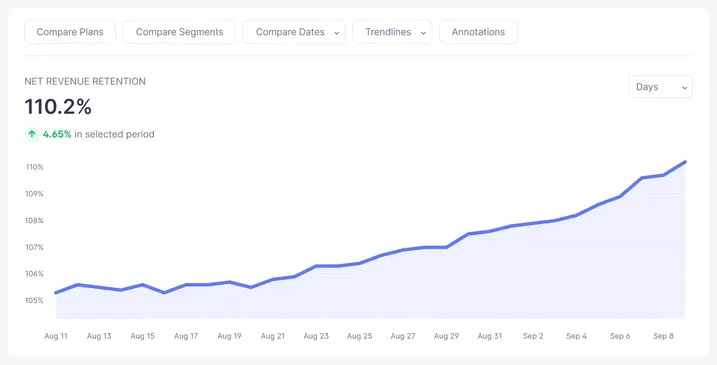
Start your free trial → or explore the live demo
Screenshot shows sample demo data.
Frequently asked questions
What is the difference between NRR and GRR?
Net revenue retention (NRR) counts expansion revenue from upgrades and cross-sells, so it can go above 100%. Gross revenue retention (GRR) leaves expansion out and only subtracts downgrades and cancellations, so it can never be higher than 100%. NRR shows how well you grow existing customers; GRR shows how well you keep the revenue you already have.
Is ARR the same as MRR × 12?
In Baremetrics, yes: Annual Run Rate is MRR × 12, your current recurring revenue projected over the next 12 months, assuming no new customers and no churn. Contract-based companies sometimes calculate ARR from the contracted annual value of live subscriptions instead, which lands close to MRR × 12 but can differ after mid-term contract changes.
What is a good monthly churn rate for SaaS?
For SaaS companies that sell to small businesses, a good churn rate is about 3–5% per month. Enterprise products should aim for under 1% monthly churn. New companies often see higher churn in their first year while they find product-market fit.
How do you calculate burn multiple?
Burn multiple = net burn ÷ net new ARR for the same period. A startup that burned $2M in a quarter while adding $1M of ARR has a burn multiple of 2×. The lower the number, the less cash the company spends to add each dollar of ARR.
Does Baremetrics calculate NRR and GRR automatically?
Yes. Baremetrics calculates net revenue retention and revenue churn (the inverse of gross revenue retention) on a rolling 30-day basis, directly from the billing data in Stripe, Braintree, Chargebee, Recurly and the other sources you connect.
