
Table of Contents

Google Analytics 4 is free, it is already installed on your site, and it is very good at telling you where your visitors came from. It cannot tell you your MRR, your churn rate, or your net revenue retention — and not because of a configuration mistake. GA4 is measuring a different thing.
If you run a subscription business, you have probably had a version of this moment. You open GA4 to answer a revenue question. You find the Monetization reports, the number does not match Stripe, and you cannot work out why. The answer is usually that GA4 was never looking at the same thing you were.
We make a revenue analytics product, so the section about us is marked. GA4 is free and excellent at its job, and this is not an argument for turning it off.
💬 CTA: Need MRR, churn, cohort retention, and LTV without instrumenting anything? Baremetrics connects to Stripe in minutes and backfills your full history. Start a free trial or book a walkthrough.
What does GA4 actually measure?
GA4 is a marketing and acquisition analytics platform. It runs client-side: a tag on your site or app fires events as people browse, and Google aggregates those events into reports about traffic, sources, engagement, and conversion.
It is built for three things: acquisition (which channel, campaign, and keyword brought this visitor), engagement (what they looked at, how long they stayed), and conversion (whether they completed an action you defined as valuable). It is tightly wired into Google Ads, which is the point. GA4 exists in large part to make ad spend measurable.
Its Monetization reports were built for ecommerce. They handle purchase events well: someone adds an item to a cart, checks out, and a transaction with a value fires. That model assumes a discrete purchase at a moment a user is present in your product.
Subscription revenue does not work like that.
Why GA4 can't report your MRR or churn
Four structural reasons, none of which are fixable with better tagging.
1. Recurring revenue produces no user action. This is the fundamental one. When a customer's subscription renews on the 14th of the month, nobody visits your site. No page loads. No tag fires. GA4 sees nothing at all. Your revenue continued and your analytics tool has no record of it. Every month, most of your revenue is invisible to GA4 by design.
2. Churn is the absence of an event. A customer who cancels through your billing portal, or whose card silently declines, or who simply stops paying, does not generate a distinguishable client-side signal. You cannot build a churn metric out of things not happening. Involuntary churn (failed payments, expired cards) is completely invisible to a client-side tag.
3. GA4 does not know who your customers are. GA4 identifies devices and browsers by default. Your billing system identifies customers by subscription. Bridging them requires deliberately implementing User-ID, keeping it in sync, and accepting that anyone browsing on two devices or blocking cookies breaks the link. Without that bridge, "revenue per customer" has no meaning in GA4.
4. Client-side collection loses data, and finance cannot use lossy data. Ad blockers, consent banners, browser tracking prevention, and users who bounce before the tag loads all remove events from the stream. That is an acceptable trade for directional marketing analysis. It is not acceptable for a number going in a board deck. GA4 revenue figures will never reconcile to Stripe, and the gap is not a bug you can fix.
Even where GA4 can see a transaction, it has no concept of the things that define subscription analytics. Crucial SaaS events, such as a payment failure or a customer upgrade, can go completely unnoticed by GA4.
![GA4 blind spot diagram [Updated]](https://baremetrics.com/hs-fs/hubfs/GA4%20blind%20spot%20diagram%20%5BUpdated%5D.png?width=749&height=392&name=GA4%20blind%20spot%20diagram%20%5BUpdated%5D.png)
Six events that constitute GA4 blind spots
GA4's real limits for SaaS teams
Beyond the category mismatch, the free tier has ceilings.
Data retention defaults to two months. New GA4 properties retain event-level and user-level data for 60 days unless someone changes it. The maximum on the free tier is 14 months. This is a common GA4 misconfiguration, and the data lost is gone permanently — changing the setting only protects data going forward.
The retention limit hits Explorations, not standard reports. This trips people up. Open a standard report, set the date range to two years ago, and numbers appear, because standard reports run on separately maintained aggregated tables. What expires is the event-level data underneath. That is what funnels, path analysis, segment comparisons, and cohort analysis are built on. For SaaS, where meaningful cohort analysis runs over years rather than months, a 14-month event-level ceiling is a hard constraint.
Sampling. Above a threshold, Explorations return sampled results rather than processing every row. Directionally fine for marketing; not something to run finance on.
Thresholding. When Google Signals or demographic data is involved, GA4 suppresses rows with too few users to protect identity. It is system-defined and you cannot turn it off, which means small segments, often your highest-value ones in B2B, can simply not appear.
Cardinality. High-cardinality dimensions collapse into an "(other)" row, so long-tail detail disappears.
GA4 360 has no published price. Reseller figures in 2026 put entry around $50,000/year, scaling with event volume, with contracts commonly running to $150,000 and beyond. It raises retention to 50 months and reduces sampling. It does not add any subscription revenue concepts.
BigQuery export is free on standard properties, which is a real change, with daily export subject to a per-day event cap. You pay only BigQuery storage and query costs, which many properties keep near zero. It is the standard workaround for the retention limit, but it is not retroactive and it requires SQL, so it is a data-team solution rather than a founder solution.
What GA4 is genuinely best at
We would not recommend removing it.
Acquisition attribution. Which channels, campaigns, keywords, and landing pages produce signups. Nothing in the revenue analytics category does this, including us.
Google Ads integration. If you spend on Google Ads, GA4 is where that spend becomes measurable, and the integration is deeper than any third party can offer.
Pre-signup funnel analysis. Everything that happens before someone becomes a customer (landing page performance, form abandonment, the path from first visit to trial) is GA4 territory, and it does it well.
Cross-platform web and app measurement, on one event model.
Price. It is free, at a level of capability that would cost real money elsewhere. For top-of-funnel marketing analytics, the free tier is genuinely hard to beat.
The honest framing is not that GA4 is weak. It is that GA4's job ends at the moment someone becomes a paying customer, and subscription businesses make most of their money after that moment.
What SaaS revenue metrics require instead
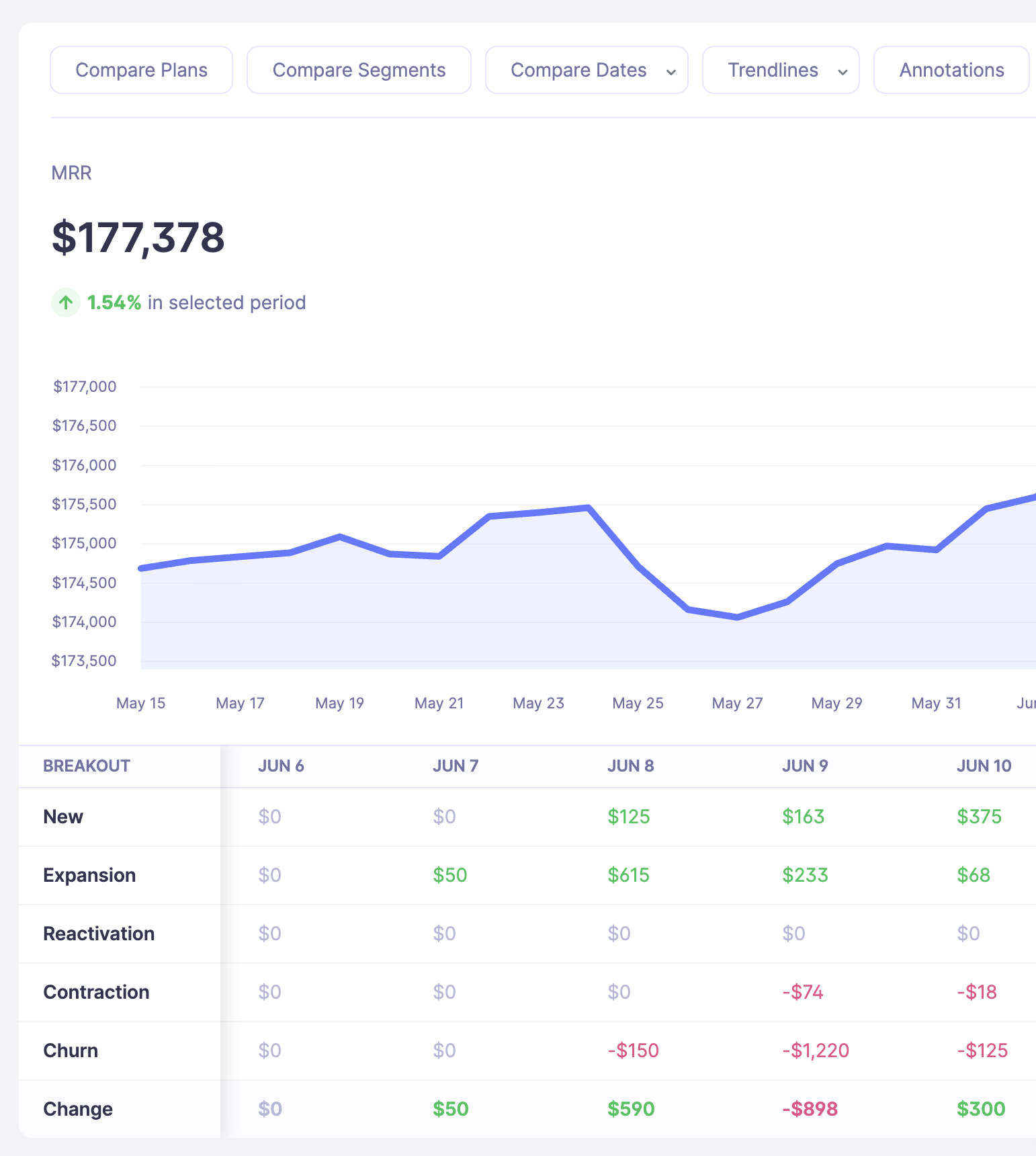
MRR with movement breakdown in Baremetrics
Revenue analytics reads your billing system rather than your website. Baremetrics connects to Stripe, Braintree, Chargebee, Recurly, the Apple and Google app stores, or a custom source via API, pulls your full billing history including years of past data, and calculates:
MRR with movement breakdown — new, expansion, reactivation, contraction, and churn, by day. Not just the total, but how the total changed and why.
Revenue and customer churn, and cohort retention tables — so you can see whether customers leave in month one or month nine, which are entirely different problems.
LTV, ARPA, and growth rate, segmented by plan, country, billing cadence, or any attribute you push in.
An investor-ready share link that exposes the metrics with customer PII stripped out.
Forecast+ — connects QuickBooks or Xero, pulls in your actual P&L, and puts runway, burn rate, CAC, and budget variance next to your subscription metrics. Included with any paid plan.
Recover ($129/month add-on) — automated failed-payment recovery: up to seven fully customizable emails, a branded card-update page, in-app banners escalating to a paywall, and SMS. This addresses exactly the churn GA4 cannot see. Published guarantee: recover more than your Baremetrics cost or your next month is free.
Cancellation Insights ($129/month add-on) — captures why someone is leaving at the moment they click cancel, with reason-specific follow-up.
None of it requires instrumentation. It is an OAuth connection and it reads what your billing system already knows. Pricing is banded by ARR: Launch $49/month up to $360K ARR, Growth $189/month to $3.6M, Scale $749/month above, on annual billing.
What we do not do: acquisition attribution, channel reporting, ad spend measurement, landing page analysis, or anything about visitors who never became customers. That is GA4's job and we are not trying to take it.
Using GA4 and Baremetrics together
The interesting questions live between the two tools.
"Which acquisition channel produces the highest-LTV customers?" needs GA4 for the channel and revenue analytics for the LTV. Neither answers it alone.
"Is our paid search traffic converting to customers who stick?" — GA4 knows the traffic converted; only your billing data knows whether those customers are still paying nine months later.
"Did the pricing page redesign work?" — GA4 measures whether more people signed up. Revenue analytics measures whether the ones who did were worth more.
The practical join is a shared identifier. Push a campaign or source attribute into your billing system at signup, and it becomes a segment on the revenue side — so you can pull up MRR and retention for a cohort defined by how they arrived. That is a small implementation detail with a disproportionate payoff. Do it early. Backfilling across a few hundred existing customers is far harder than capturing at signup.
Comparison table
| Baremetrics | Google Analytics 4 | |
| Category | Subscription revenue analytics | Marketing and acquisition analytics |
| Reads | Your billing system, server-side | Client-side events from your site or app |
| Cost | From $49/mo (annual billing) | Free; 360 unpublished, reported ~$50K+/yr |
| Setup | OAuth to billing, minutes | Tag installation and event configuration |
| MRR and movement breakdown | ✅ | ❌ |
| Revenue and customer churn | ✅ | ❌ |
| NRR / cohort retention by revenue | ✅ | ❌ |
| LTV and ARPA | ✅ | ❌ |
| Failed payment visibility and recovery | ✅ Recover ($129/mo add-on) | ❌ Structurally invisible |
| Financial forecasting (runway, burn, CAC) | ✅ Forecast+ | ❌ |
| Reconciles to your billing system | ✅ | ❌ Client-side loss is unavoidable |
| Acquisition and channel attribution | ❌ | ✅ Best in class |
| Google Ads integration | ❌ | ✅ |
| Pre-signup funnel and landing page analysis | ❌ | ✅ |
| Event-level data retention | Full history | 2 months default, 14 months max (50 on 360) |
| Sampling | None | Yes, above volume thresholds |

