Table of Contents
If you build apps for Shopify merchants, you need to track SaaS metrics in order to accurately evaluate your business performance.
Looking for a Mantle alternative for your Shopify app? Baremetrics gives you deeper subscription metrics and revenue recovery.
The problem is that the Shopify Partners platform doesn’t calculate these metrics. Rather, it only provides high-level insights. Without metrics showing you how things are going, it can feel like you’re running your business in the dark.
That’s why growth-focused apps use Baremetrics, a SaaS metrics and customer engagement solution built for SaaS and subscription businesses. Baremetrics integrates seamlessly with the Shopify Partners platform to help you grow your Shopify app, faster.
Read on to learn more about the benefits of integrating Shopify with Baremetrics for SaaS and subscription businesses. We’ll also explain how easy it is to set up with our pre-built integration.
Why integrate Shopify Partners with Baremetrics?
Here are six reasons you should consider using Shopify and Baremetrics together.
1. Integrate multiple sources for deeper insights
In a competitive market like Shopify Partner Apps, looking at data from a variety of sources is key to identifying trends and making the right business decisions. With Baremetrics, you can overcome the tedious and complicated task of integrating different data sources and formats into a single, unified metrics dashboard.
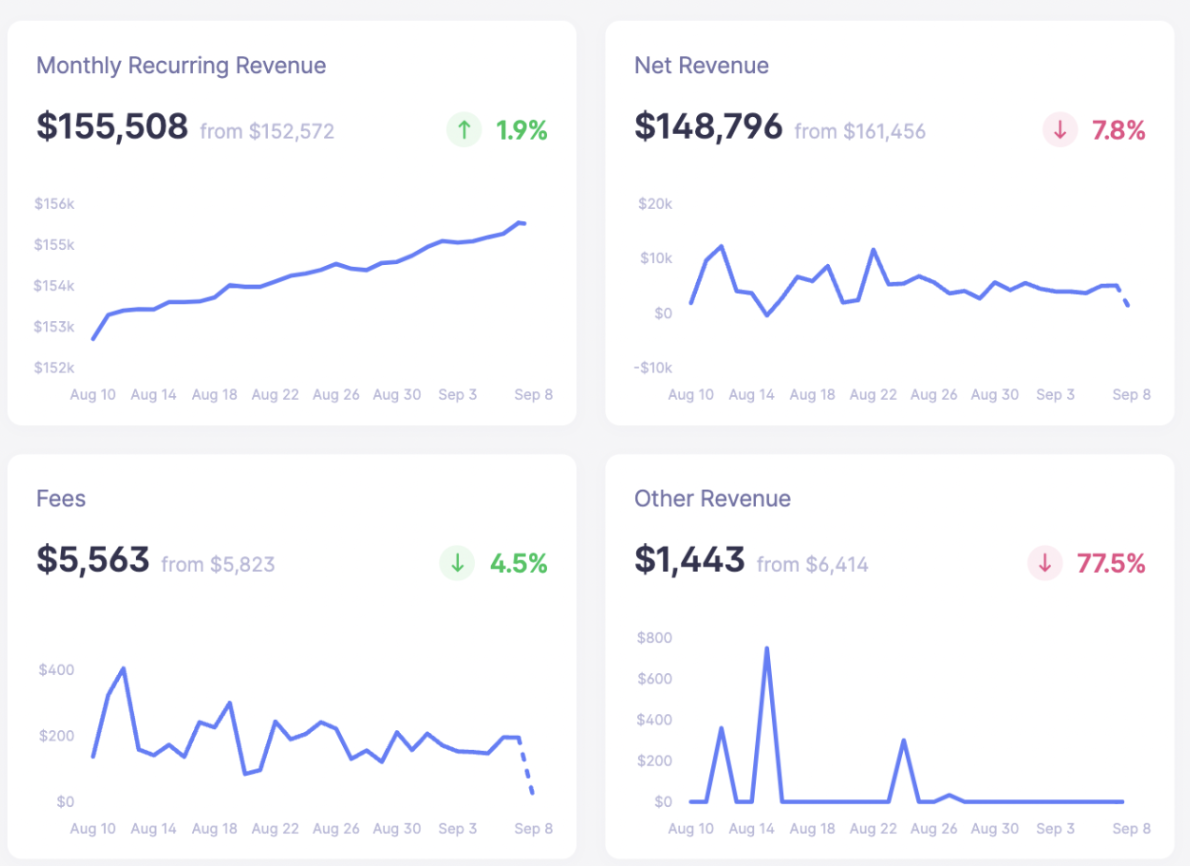
While tracking SaaS metrics is crucial for growing your Shopify Partner App business, it can be difficult to calculate them all on your own. Baremetrics calculates MRR for your Shopify Partner App along with 25+ other metrics that are essential for subscription-based businesses.
In short, Baremetrics helps you make the most of your data by doing the heavy lifting for you. By pulling all of the data and consistently performing calculations, you’ll have access to accurate metrics that can help you uncover deeper insights.

2. Build custom dashboards
Every business is different, so that means there’s no one-size-fits-all when it comes to analytics dashboards. The Shopify Apps dashboard only offers a high-level breakdown of installs, uninstalls, and earnings — this isn’t nearly enough information to make effective decisions to grow your SaaS business.
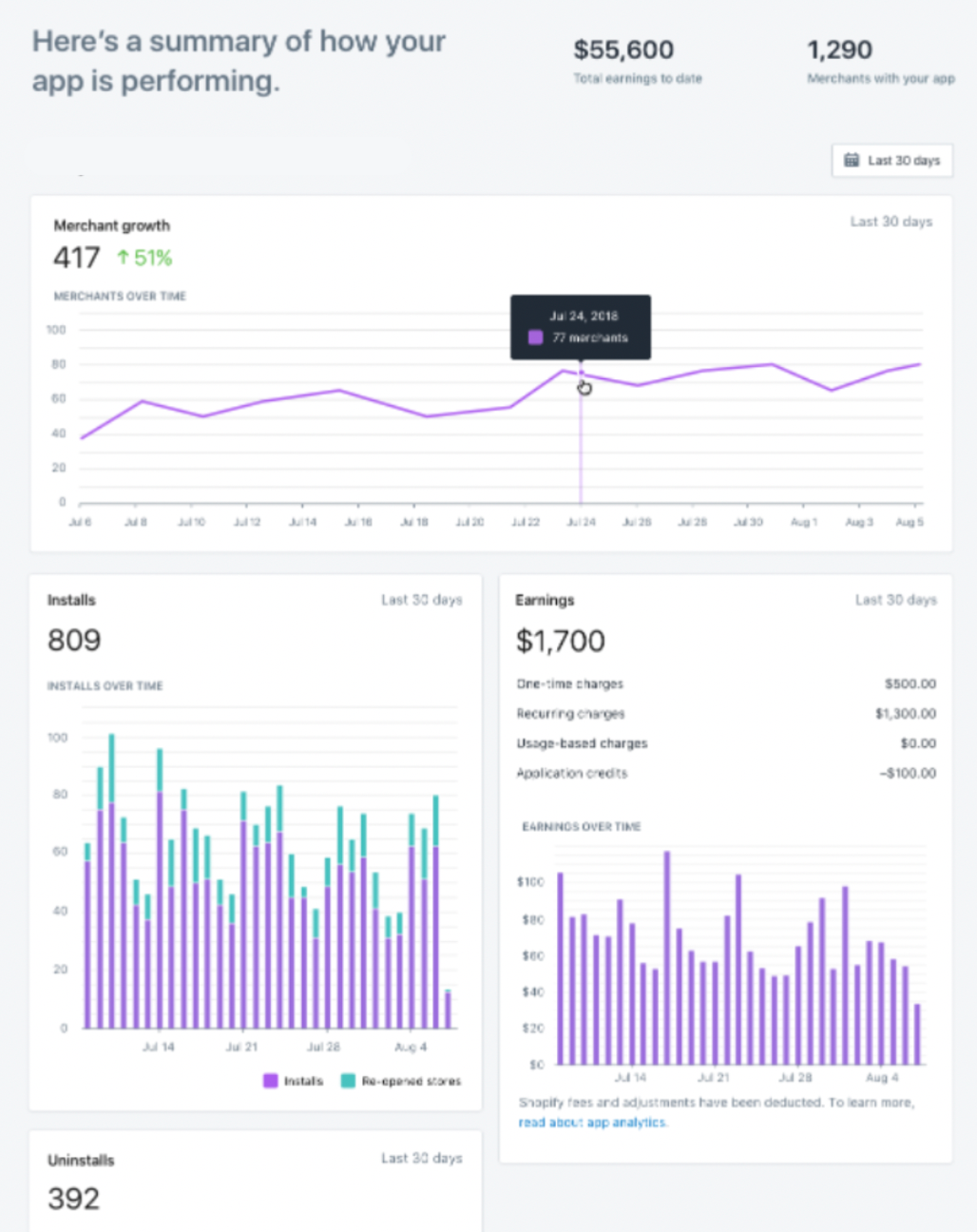
Shopify offers a basic dashboard with some limited customization options, but Baremetrics enables you to easily create dashboards that meet your business needs. You can use drag and drop tools to build views with full control over the metrics and layouts you see. This helps you quickly review the most important data for your business.
3. Maximize retention with advanced churn analytics
As we mentioned before, Shopify provides little insight into customer trends or churn. This limits your ability to understand what’s driving customers behavior and how you can stop them from churning. You need to be able to drill down into different customer segments, cancellations, feedback, and more.
Baremetrics gives you rich customer profiles that include insights into customer behavior and failed payments.
For example, you can track charges, payments, and any other transaction to better understand how things are going for individual customers. This helps you identify customers that are at risk of churning so you can make changes to maximize retention.
These in-depth customer profiles help you uncover overall trends about why customers have churned in the past. That way, you can follow up with discounts, schedule sales calls, or implement other tactics to maximize customer retention for the future.
4. Real-time analytics
Shopify analytics provides high-level insights, but when you’re relying on data to make business decisions, it’s important to have in-depth metrics right at your fingertips. Baremetrics provides real-time metrics so that you can see what’s happening today and make timely decisions that propel your business forward. In addition, Baremetrics publishes live benchmarks from over 800 small and medium sized SaaS businesses. This data includes MRR, LTV, churn, and other essential SaaS metrics grouped by average revenue per user. By comparing your metrics to other SaaS businesses within your cohort, you can set realistic goals for your business and track your progress in real time along the way.
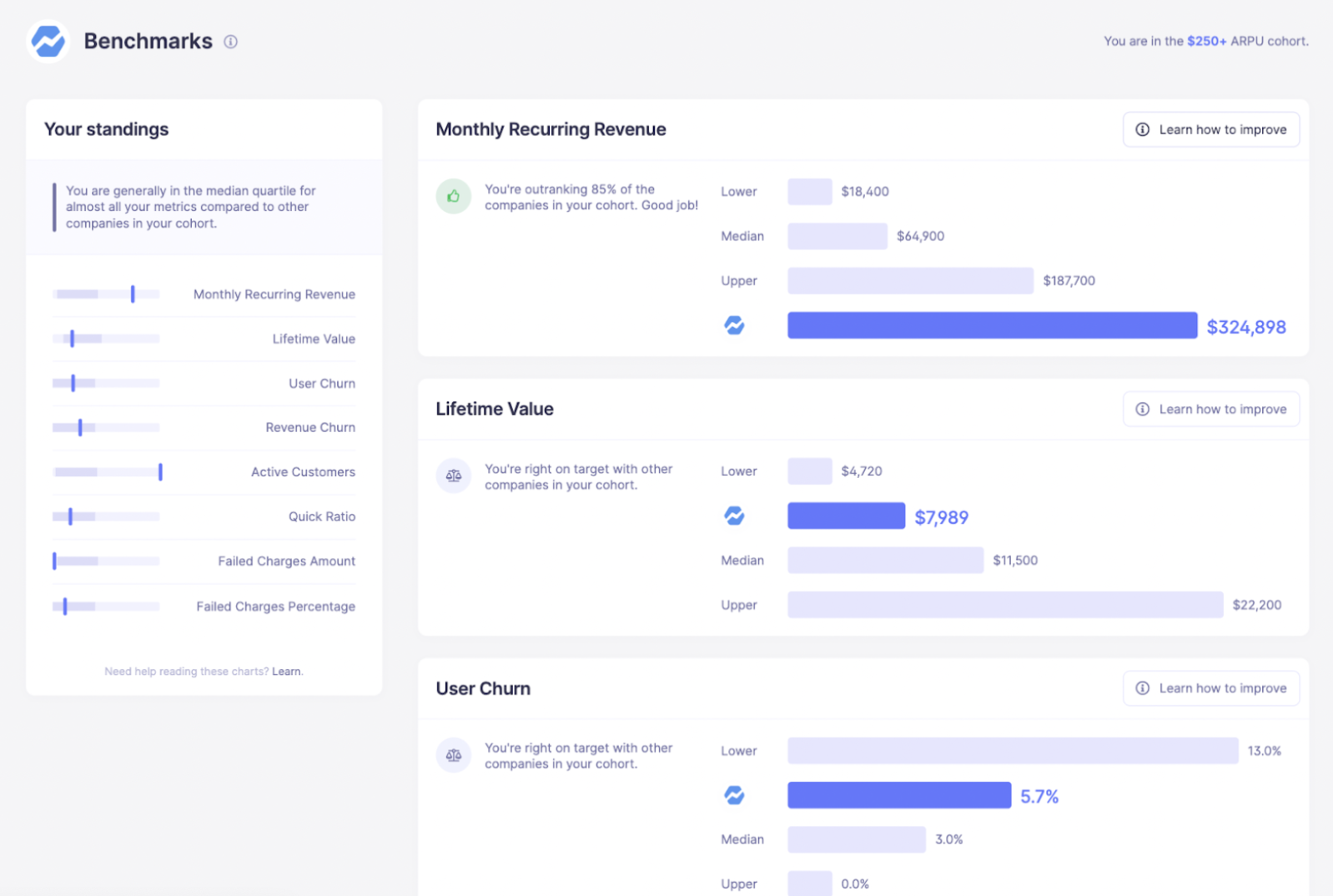
Benchmarks cohorts are grouped by Average Revenue Per User, essentially the average amount you bill a given customer. The data shows how you compare with other companies who bill similar amounts.
5. Segment SaaS metrics by customer cohort
When you’re trying to understand how your business is performing, you don’t want to spend time searching through large amounts of data to find the answers you’re looking for. Instead, you’ll want to track the business metrics that are most relevant to growing a Shopify app, and segment your data to get answers to specific questions.
The key to doing this lies in Baremetrics’ powerful segmentation tools– a feature that’s unavailable with Shopify Partners’ analytics. With the increased level of granularity that Baremetrics provides, you can better understand trends for specific regions, plans, or other customer segments.
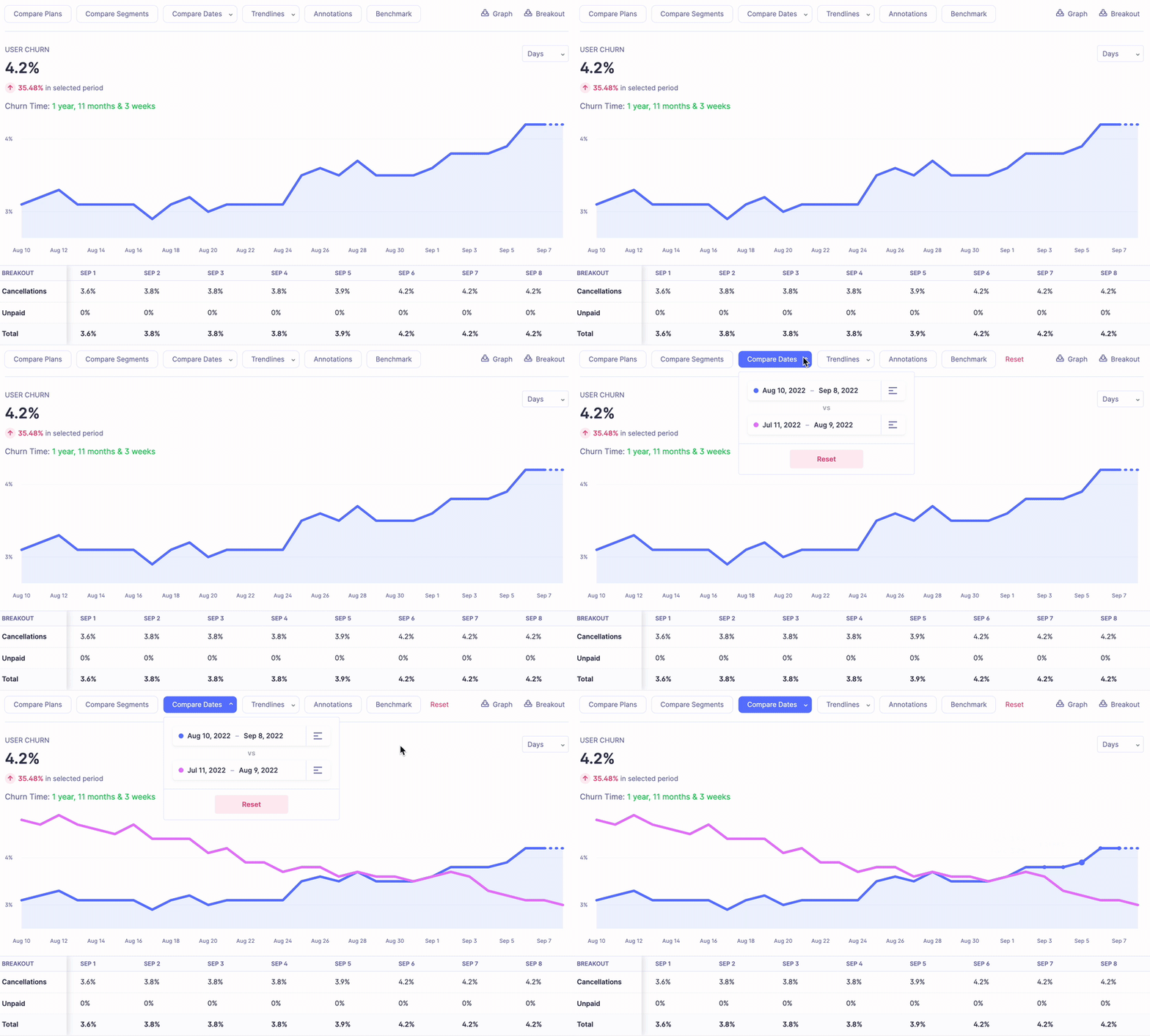
Segment over 25 subscription metrics by customer cohorts like plan type, LTV, or specific date ranges.
6. Get personal support for your account
Shopify is a huge company, and its primary users are eCommerce store owners. Although app developers can get resources though the Shopify Partners community, individualized support can be pretty limited.
In contrast, Baremetrics is built specifically for SaaS businesses and has a knowledgeable support team who can help you get the most out of your Baremetrics integration with Shopify.
What’s new in the Baremetrics Shopify connector
Shopify doesn’t report app revenue the way a conventional subscription billing system does. Payouts follow Shopify’s own schedule rather than the merchant’s billing date, a failed payment is never announced, and usage charges sit outside the plan price entirely. Any tool reading that data has to take a position on what each of those silences means.
Through 2026 we’ve moved those positions out of our code and into settings you control, per connection. You’ll find them under Settings → Connections, on the settings page for your Shopify source. New connections are asked right after connecting, which is the cheapest moment to choose: settings are read while your history is being built, so picking at connect time is free, while changing one later rebuilds that connection’s history.
Revenue timing: when a charge counts
By default, a charge counts when its payment settles, which follows Shopify’s payout cycle. Switch to counting a charge on its billing date and MRR moves as soon as Shopify bills, so new subscriptions and upgrades appear straight away instead of a payout cycle later. This also governs conversions: on billing date, a merchant whose trial converts counts as paying the day their first charge is raised, which is usually the day the trial ends.
Churn timing: when a departing merchant stops counting
You can count a merchant through the end of the period they already paid for, or churn them the day they leave. Counting them through the paid-through date is the default, and it matches how most founders think about a month they have already been paid for.
Payment grace period: telling a retry apart from a departure
Shopify never reports a failed payment, so a merchant whose card is being retried looks exactly like one who walked away. Set a grace period of anywhere from 0 to 60 days and Baremetrics waits that much longer before reading the silence as churn. When it does churn, the churn is dated back to the last day they paid for, so it lands in the month they stopped paying rather than the month it was noticed.
Refunds: whether a refund ends the subscription
By default, a fully refunded merchant is treated as churned. If you issue goodwill refunds to merchants who stay subscribed, switch to keeping them as a customer — then only a cancellation or an uninstall churns them, and the refund affects that charge’s revenue alone.
Usage charges and currency
If your app bills for usage on top of a plan, those charges are tracked as their own metric rather than disappearing between plan revenue and payouts. Multi-currency handling has been corrected across the connector as well, so MRR converts consistently no matter what your merchants are billed in.
How to integrate Shopify with Baremetrics
Baremetrics helps you get more out of your Shopify analytics, transforming your Shopify Partner App from a project into a data-driven business. By tracking the metrics most relevant to Shopify App Developers, you’ll be able to gain a deeper understanding of your business performance to make better decisions.
Connecting Shopify is quick and easy using our pre-built integration. Simply create an API client in your Partners Dashboard and fill in the appropriate credentials to get started. Once you’ve set up the connection, you’ll have access to a clear dashboard with real-time insights into your business.