Table of Contents
If you're evaluating Chargebee for subscription management, here's the honest summary. It's one of the most mature platforms for the operational side of recurring revenue (plan changes, invoicing, dunning, tax, self-service). It deliberately stops short on the analytical side. Knowing where that line sits is the difference between a smooth rollout and a surprise BI project six months in.
Subscription management in Chargebee at a glance
| Capability | What you get |
|---|---|
| Lifecycle automation | Trials, upgrades, downgrades, pauses, renewals, automatic proration |
| Plan catalog | Flat, tiered, usage-based, and hybrid pricing; add-ons, coupons, ramp deals |
| Invoicing | Automated, consolidated, and advance invoicing; quote-to-cash for B2B |
| Recovery | Smart Dunning (Performance+); Retention add-on from $250/mo |
| Global | 100+ currencies, multi-jurisdiction tax, localized checkout |
| Gateways | 35+, including Stripe, Braintree, PayPal, and Adyen |
| Security | PCI DSS Level 1 certified platform |
| Analytics | Billing reports; cohorts need exports — pair a dedicated analytics layer |
What "subscription management" means in Chargebee
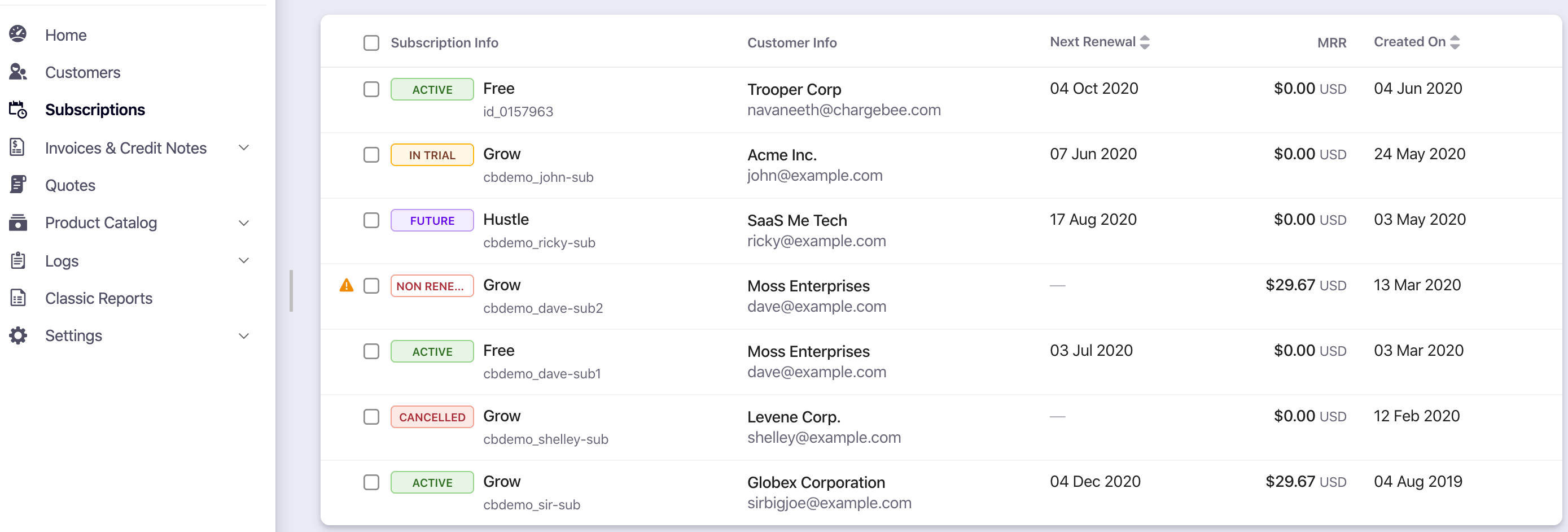
Chargebee is billing orchestration, not payment processing. It sits on top of 35+ gateways, including Stripe, Braintree, PayPal, and Adyen. On that foundation it automates the full subscription lifecycle:
- Sign-ups through renewals — trials, upgrades, downgrades, mid-cycle proration, and pauses (a smart retention alternative to cancellation), all handled automatically.
- Plan catalog flexibility — flat, tiered, usage-based, and hybrid pricing; plan families; add-ons; coupons; ramp deals. Product and finance teams can change any of it from the UI without an engineering ticket. Arguably Chargebee's biggest organizational advantage.
- Invoicing and quote-to-cash — automated invoices, consolidated and advance invoicing, and quote-based workflows for negotiated B2B contracts.
- Involuntary churn defense — Smart Dunning retry sequences on the Performance plan, plus a dedicated Chargebee Retention add-on from $250/month (50 dunning sessions).
- Global operations — built-in multi-jurisdiction tax, 100+ currencies, localized checkout, and self-serve customer portals.
Subscription management in Chargebee
Chargebee has run this playbook since 2011, and the platform is PCI DSS Level 1 certified. For the full company picture (funding, customers, pricing detail), see our What Is Chargebee? breakdown.
How a Chargebee rollout actually works
The setup follows the same arc at most companies. Connect a payment gateway (or several). Rebuild your plan catalog in Chargebee's UI: plans, add-ons, coupons, currencies. Wire up checkout — hosted pages for self-serve, quotes and invoices for sales-led deals. Turn on the customer portal so subscribers manage their own upgrades and payment methods. Then configure the lifecycle automations: proration rules, dunning sequences, tax regions, and webhooks into your CRM and accounting stack.
Business-stack integrations include Salesforce, HubSpot, Xero, QuickBooks, Avalara, and Slack. None of this is hard individually. The project is the catalog migration and invoice testing. That's where implementation time actually goes.
What's new for subscription management in 2026
Chargebee's 2026 releases lean toward flexibility and global payments. Multi-plan subscriptions now let one checkout session carry several plans on the same billing frequency — one subscription, one invoice. Twikey joined the gateway list for SEPA Direct Debit across Europe. A May 2026 Avalara partnership embeds global e-invoicing and live tax reporting into the billing lifecycle. And the company is building usage billing for AI products: tokens, API calls, agent workflows. The direction is consistent. Deeper billing operations, not analytics.
What it costs in 2026
- Starter: free until $250,000 in cumulative lifetime billing (the threshold never resets), then 0.75% on all billing.
- Performance: $599/month ($7,188/year, annual commitment), covering up to $100K in monthly billing with 0.75% on overage (Chargebee's standard overage rate; the pricing page doesn't print a Performance-specific figure).
- Enterprise: custom, with multi-entity support.
Two budgeting notes. First, Chargebee's fees are additive — your gateway's processing fees (e.g., Stripe's 2.9% + 30¢) come on top. Second, Chargebee is an implementation project, not a weekend switch. That's fine if you're buying it for the long haul; painful if you're experimenting.
Where Chargebee stops: subscription analytics
Chargebee's reporting covers billing operations well. It isn't an analytics platform, though. In 2025–26 user reviews, the recurring complaints are that cohort analysis requires manual exports and forecasting requires a separate BI tool. Concretely, Chargebee won't show you:
- MRR movements broken out by new, expansion, contraction, and churn
- Churn and retention against industry benchmarks
- LTV, ARPU, and revenue segmented by plan, cohort, or customer attributes
- Forward revenue forecasts based on your actual subscription behavior
Those aren't nice-to-haves. For a subscription business, they're how you decide what to fix next.
Closing the gap with Baremetrics
Baremetrics connects natively to Chargebee and calculates 26 subscription metrics automatically (MRR, ARR, churn, LTV, ARPU, expansion revenue, cohorts) in one live dashboard. No exports, no spreadsheet stitching. If you run the common architecture of Stripe processing payments underneath Chargebee's subscription layer, Baremetrics normalizes both into a single revenue view. And for Stripe-processed payments, Recover automates failed-payment recovery at a flat $129/month with no session caps — the median customer earns back roughly 8× its cost in a month, per our May 2026 recovery benchmark.
![Customer Segments by Country [Sceened in]](https://baremetrics.com/hs-fs/hubfs/Customer%20Segments%20by%20Country%20%5BSceened%20in%5D.png?width=920&height=401&name=Customer%20Segments%20by%20Country%20%5BSceened%20in%5D.png)
Comparing segments in Baremetrics
The rest of the stack. Segmentation is unlimited: plan, country, billing cadence, or any custom attribute, each with its own saved dashboard. Forecast Plus connects QuickBooks or Xero and models runway, burn rate, CAC, and budget scenarios from your actual P&L. Cancellation Insights captures why customers leave, then fires reason-based win-back emails and Retention Offers.
The dunning math, side by side. Chargebee Retention starts at $250/month for 50 dunning sessions. Recover runs $129/month flat with no session caps — and every email, widget, and SMS is yours to edit.
Time to value. Setup is about 30 minutes, historical data included. You get unlimited onboarding calls, ~2-minute chat response, and working sessions where the team builds your first segments with you. Pricing starts at $49/month with a 60-day money-back guarantee.
Sign up for a free trial to learn how Baremetrics can help you grow your subscription business today.